Sprite stacking, from a 3D model
A sprite stack is a pile of flat slices drawn one pixel apart and turned together, so a top-down sprite can rotate to any angle and still look solid. Here is how it works, and how to cut the slices from a 3D model instead of drawing each one.
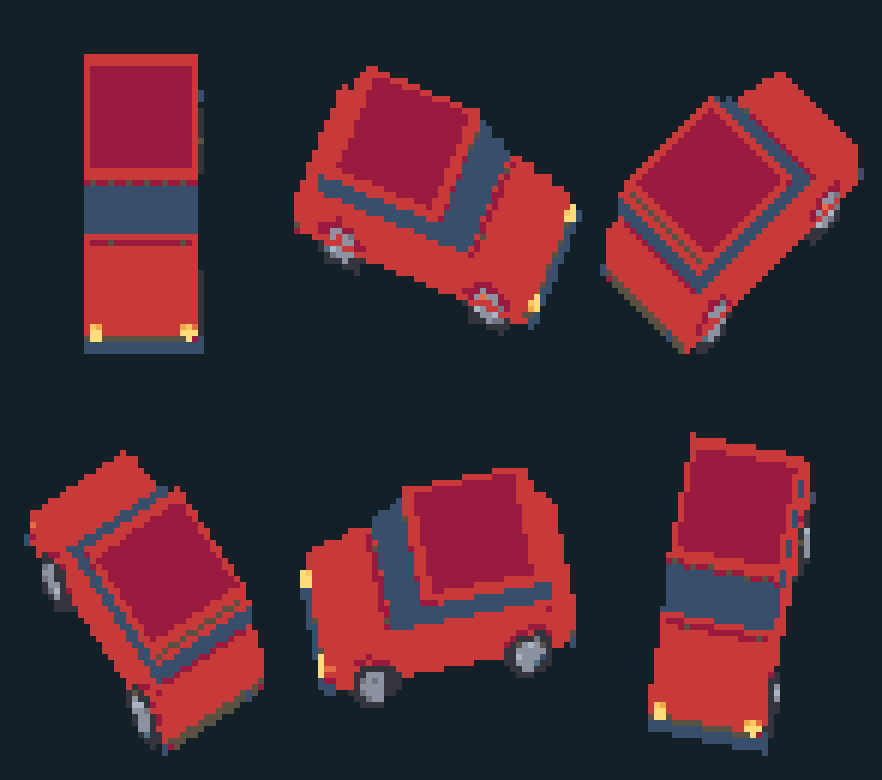

What it is
Sprite stacking draws an object as a pile of thin horizontal slices. Each slice is a small top-down picture of the object at one height: the wheels at the bottom, then the body, the windows, the roof. The game draws slice 0, then slice 1 one pixel higher on the screen, then slice 2 another pixel higher, and so on. Seen from above at an angle, the pile reads as a solid object.
The trick is the turning. To rotate the object, the game rotates every slice by the same angle but keeps moving each one straight up by its height. The object turns to any angle, smoothly, with real depth, and it is still made of pixels at one size. That is what makes stacks popular for top-down vehicles, buildings and props in games with a free-turning camera.
Why use it instead of a sprite sheet
A sprite sheet holds a fixed number of directions: 8, 16, perhaps 32 for a car. A sprite stack has every direction, because the game makes them as it draws. It also turns with the camera: if the whole world rotates, every stacked object rotates with it and keeps its depth.
The costs: a stack is only seen from one height, it does not do limbs or soft shapes well, and every frame of animation needs its own slices. For a walking character, a sprite sheet rendered from 3D is still the better fit; for a car the player steers anywhere, a stack is hard to beat. Rotating vehicle sprites compares the sheet approach.
Making the slices by hand
The usual way is to draw the slices in a pixel editor, one layer per height, or to build the object in a voxel editor and export its layers. It works, but every slice must line up with the ones below it, the colours must shade from slice to slice, and a 40-pixel tree is 40 drawings.
From a 3D model with Pixor
Pixor cuts the slices from a 3D model. pxr voxels turns any model (glTF, GLB, FBX, OBJ or a MagicaVoxel file) into voxels of the height you ask for, colours its surface from the model’s textures in the look’s own palette, and with --stack writes the stack:
pxr voxels car.glb -o car.vox --height 16 --stack --preset seloutThat writes car_stack.png, the slices side by side, bottom first, and car_stack.json with the slice size and count. The .vox file opens in MagicaVoxel if you want to touch up a voxel. Because the colours come from the same look as your sprite sheets, a stacked car and a rendered character share one palette.
Drawing the stack in Godot 4
A stack needs no special node: draw each slice with its own offset and the same rotation.
extends Node2D

@export var sheet: Texture2D
@export var slices := 16
@export var slice_size := Vector2(20, 43)
@export var angle := 0.0:
	set(value):
		angle = value
		queue_redraw()

func _draw() -> void:
	for k in slices:
		# Slice k one pixel above slice k - 1, every slice turned by the same angle.
		draw_set_transform(Vector2(0, -k), angle)
		var src := Rect2(Vector2(k * slice_size.x, 0), slice_size)
		draw_texture_rect_region(sheet, Rect2(-slice_size / 2, slice_size), src)
Set the texture’s filter to Nearest and scale the node by a whole number so every pixel stays square. Other engines do the same thing: a loop over the slices, a rotation, and an offset that is not rotated.
Common mistakes
- Rotating the offsets. If the whole stack is rotated as one sprite, the slices slide sideways instead of up and the object falls apart. Only each slice turns; the upward step stays vertical on screen.
- Too few slices. Each slice should be one screen pixel of height. Gaps appear as stripes when the object turns.
- Scaling the stack by a non-whole number. The slices land on different pixel sizes and the edges shimmer; see mixels.
Questions
How many slices does a sprite stack need?
One slice per pixel of height on screen. A car 16 pixels tall is 16 slices; a tree 40 pixels tall is 40. Fewer slices look like a stack of cards when the object turns.
Can a sprite stack be animated?
Each animation frame needs its own set of slices, which grows quickly, so stacks suit things that turn rather than things that move their limbs: vehicles, buildings, trees, props. Characters usually stay as sprite sheets.
Is sprite stacking the same as voxels?
They are close relatives: each slice is one layer of voxels seen from above. That is why a voxel model, or a 3D model turned into voxels, gives a sprite stack directly.