Car and spaceship sprites at every angle
A car in a top-down racer or a ship in an Asteroids-style shooter turns to any heading. Rotating one sprite in the engine breaks its pixels; drawing 32 angles by hand takes days. From a 3D model, every angle is a render.

Why vehicles need so many angles
A character in a top-down RPG walks in four or eight directions, so it needs four or eight sides. A vehicle is different: it steers. A car turning a corner or a ship rotating under the stick passes through every heading in between, and if the sprite can only show eight, it snaps from one to the next in visible steps of 45 degrees.
Games solve this in one of three ways:
- Rotate one sprite in the engine. Cheap, but rotating pixel art resamples it. At anything other than 90 degrees, lines break up, single pixels double or disappear, and with smoothing on the edges go soft. It stops looking like pixel art.
- Draw every angle by hand. It looks right, and it is a lot of work: 32 angles of a car, plus its damaged version, plus each team colour. Every change to the design means redrawing all of them.
- Render every angle from a 3D model. This is what racing and shooter games of the 1990s did with pre-rendered sprites, and what Pixor does with a ring of cameras.
How many angles
| Angles | Step | Good for |
|---|---|---|
| 8 | 45° | Tanks and units that turn slowly, strategy games |
| 16 | 22.5° | Most top-down racers and shooters, turrets |
| 32 | 11.25° | Smooth steering, ships that rotate freely |
| 64 | 5.6° | Large vehicle sprites, slow precise turning |
The bigger the sprite, the more angles it needs: a 16-pixel ship hardly changes between two close headings, a 64-pixel car visibly jumps.
Top-down, straight down
For a ship or a car seen from above, render with the top-down view and a ring of sides:
pxr render race-car.glb --preset selout --view top-down --size 40 --ring 16 \
  --clip none --export png,json -o car.png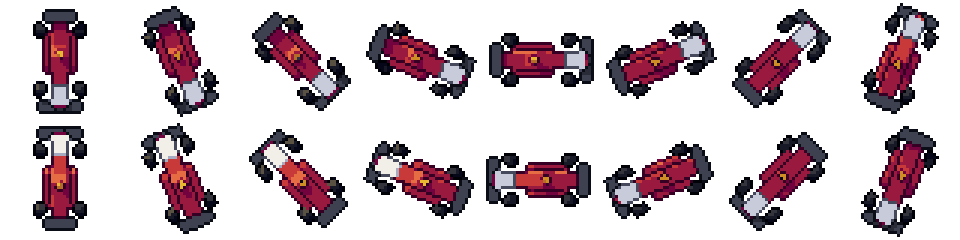
--ring 16 puts 16 cameras round the model, counter-clockwise from the front, one per side, all sharing one size and one pixels-per-metre scale, so the car is the same size at every heading and turns about one fixed pivot. The sheet has a row per side; the JSON names each one, so the game picks the frame from the heading. --ring goes from 1 to 64; --sides 0,10,20,... takes your own list of angles instead.
In the app, add a camera with + in the Outliner, choose A camera for… › Top-down shooter (straight down, 16 sides, 32 px), or set View on the South camera and use Ring round the model for 4, 8, 16 or 32 sides.
The racing view
Top-down racers from the arcade era often looked down at a slant, so each angle also showed the side of the car. The Racing camera does that: 12° down, 16 sides, 64 px.
pxr render race-car.glb --preset selout --camera racing --clip none -o car-racing.png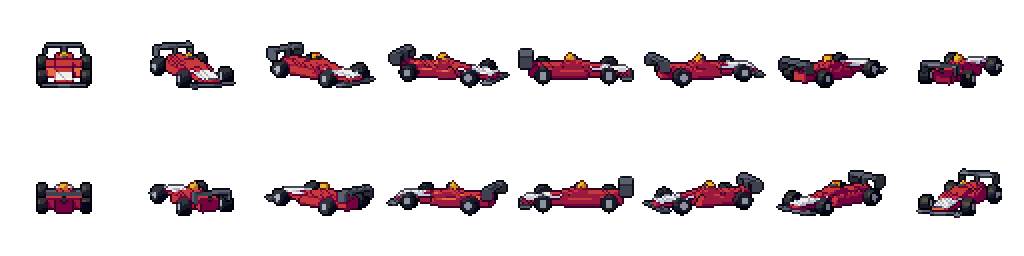
Light that stays put, or turns with the car
By default the key light follows the camera: it sits on the same side of every view. For a top-down game that is often what you want, because every heading is lit alike and a sprite looks the same wherever it points.
If the light should stay put in the world, so a car facing away from the sun has its shadowed side towards the player, turn Follows the camera off on the key light (--light-space world). The animation above uses a third way: --turntable 32 turns the model itself once under one camera, as an action of 32 frames, so the light glides across the hull as it turns.
Animated at every angle
A vehicle often moves while it turns: wheels spin, an engine flickers, a turret tracks. Give it a clip and every side gets every frame:
pxr render spaceship.glb --preset selout --view top-down --size 48 --ring 32 \
  --clip all --export png,json,godot
Sheets grow quickly at 32 sides; --max-height 4096 splits a tall sheet into pages, whole clips to a page, and --dedupe stores identical frames once. The library’s spaceship, race car and police car are free CC0 models to try it with.
Variants for free
Because every angle comes from one model, variants cost nothing to draw. --variant hit-flash writes a flash version for damage; --team with --variant team:blue recolours a team colour; --material-colour gives a car a new paint job. The palette variants section of the manual lists them all. For ships that fly up the screen rather than turn, see shmup sprites.
Questions
How many rotations does a top-down car sprite need?
16 is the usual minimum for smooth steering; 32 looks smooth at most speeds, and 64 suits large sprites or slow, precise turns. Ships in Asteroids-style games are often 16 or 32. Fewer than 16 reads as jerky.
Why not rotate one sprite in the engine?
Rotating pixel art by anything other than 90 degrees resamples it: lines break, single pixels double or vanish, and with filtering the edges blur. A render at each angle keeps clean one-pixel lines at every heading.
Can the vehicle have an animation at every angle too?
Yes. With a clip, every side gets every frame: a ship's thrust flicker or a car's spinning wheels at 16 headings is one sheet with a row per side.