What is a sprite sheet?
A sprite sheet is one image that holds every frame of a sprite's animations, side by side, with data that says where each frame is. Here is how sheets are laid out, what the data file holds, why the frame size and the pivot matter, and how game engines load them.

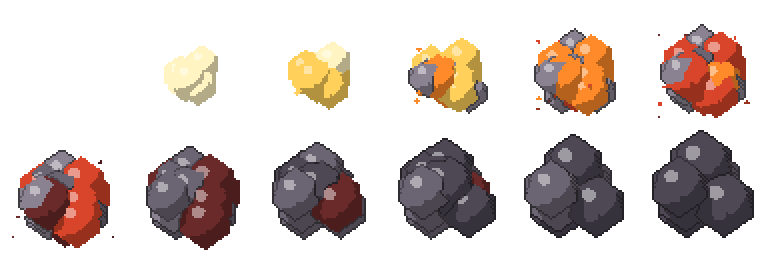
What it is
An animation is a list of small pictures. A sprite sheet puts all of them on one image: a walk’s eight frames in a row, the attack under it, then the jump. The game loads that image once and shows one rectangle of it at a time.
A sheet is two things together:
- The image, usually a PNG with transparency.
- The data: where each frame is, which frames make which animation, how long each frame is shown, and where the sprite stands. Sometimes the data is a JSON or XML file beside the image; sometimes it is only a frame size you type into the engine.
Layouts
| Layout | How frames are placed | Good for |
|---|---|---|
| Grid | every frame in a cell of the same size, one row per animation (and per side) | most games; easy to read and slice by hand |
| Strip | every frame of one animation in a single row | one animation per file; GameMaker, simple loaders |
| Packed | each frame trimmed to its pixels and packed tightly, its position kept in the data | big sheets, mobile games, texture limits |
A grid or strip can be cut by frame size alone, with no data file. A packed sheet can only be read with its data, because every frame has its own rectangle and offset.
Frame size and pivot
Two numbers decide whether an animation plays steadily:
- The frame size (cell size), such as 32×32. In a grid every frame has it, even when the sprite fills only part of the cell. Keep it the same for every animation of a character, or the sprite will jump when it switches from walk to attack.
- The pivot (also called origin or anchor): the point in the frame the engine puts at the sprite’s position, usually between the feet. If the pivot is on the same pixel in every frame, the character stands still while it animates; if not, it swims.
The data file
The most common data format is the JSON that Aseprite and TexturePacker write, which many engines and plugins read. Here is part of one, for a frog’s hop:
{
  "frames": [
    {
      "filename": "frog_Hop_South_00.png",
      "frame": { "x": 0, "y": 0, "w": 32, "h": 32 },
      "duration": 83,
      "pixor": { "action": "Hop", "side": "South", "pivot": { "x": 16, "y": 23 } }
    }
  ],
  "meta": {
    "size": { "w": 192, "h": 128 },
    "frameTags": [ { "name": "Hop_South", "from": 0, "to": 5, "direction": "forward" } ]
  }
}frames[i].frameis the frame’s rectangle on the image.frames[i].durationis how long it is shown, in milliseconds.meta.frameTagsgroups frames into animations by name.- On a packed sheet,
spriteSourceSizeandtrimmedsay where the trimmed frame sits in its full cell.
How engines load a sheet
- Godot 4. An
AnimatedSprite2Dplays aSpriteFramesresource: a list of animations, each a list of frames cut from a texture. In the SpriteFrames panel, Add frames from a Sprite Sheet cuts a grid by its number of rows and columns. Set the texture filter to Nearest for crisp pixels. - Unity. Import the PNG as a Sprite, Sprite Mode Multiple, Filter Mode Point, Compression None, then slice it in the Sprite Editor by cell size (Grid By Cell Size) and set each sprite’s pivot. Drag a row of frames into the scene to make an animation clip. With the 2D Aseprite Importer package, an
.asepritefile becomes clips by itself. - GameMaker. Import Strip Image cuts a strip or grid into a sprite’s frames by frame count and size. Set the sprite’s origin to the pivot. One sprite is one animation, so a strip per animation is the simplest.
- Your own code. Read the JSON, draw
frameat the sprite’s position minus the pivot, and move to the next frame whendurationhas passed.
Godot 4 8-direction sprites and 3D to pixel art in Unity go through both engines with a full character.
Common problems
- Blurry frames. The engine filters the texture. Use nearest-neighbour (Point in Unity) and no compression.
- Lines of the next frame at the edge. Texture sampling bleeds across frames. Add padding between cells, or extrude each cell’s edge pixels.
- The sprite jumps between animations. Frame sizes or pivots differ. Use one cell size and one pivot for every animation of a character.
- Frames out of order. Number frames with leading zeros (
walk_08,walk_10), or tools sortwalk_10beforewalk_8.
How Pixor exports sprite sheets
Pixor renders a 3D model’s animations, from every side, straight to a sheet. Every export writes a PNG sheet with one row per action and side, one column per frame, every cell the same size and the pivot on the same pixel in each cell (a clip whose effect counts toward the fit gets bigger cells of its own, and its frames say so in the JSON). A row is named for its action and side, such as walk_Southeast. Beside it, Pixor can write:
- JSON in Aseprite’s array layout: rectangles, durations, a tag per action and side, the cell size (
meta.pixor.cell) and the pivot (meta.pixor.pivot), and a frame’s ownpixor.cellandpixor.pivotwhere its clip has cells of its own size; - an Aseprite file with a tag per action and side and a
pivotslice; - a Godot
SpriteFramesresource (name.tres) forAnimatedSprite2D, or a whole Godot scene, wired; - GIF, APNG and WebP files, one per action and side, and normal, depth and emission maps with the same layout.
In the Asset graph, the Arrange node sets the layout: grid or strip, padding, extrude, power of two, Trim empty space (a packed sheet, with each frame’s place kept in the JSON), Store repeated frames once, Max sheet width, Max sheet height and Frames per row. From the command line:
pxr render knight.glb --clip all --ring 8 --export png,json,godot -o out/knight.png
pxr render knight.glb --clip walk --layout strip --padding 1 -o out/knight_walk.png
The export manual has every format and engine, and GLB and FBX to sprite sheet goes from a model file to a sheet. For sheets you already have, the free sprite sheet slicer, sprite sheet maker and sprite sheet to GIF tools work in the browser.
Related
Questions
What is the difference between a sprite sheet and a texture atlas?
A texture atlas is any image that packs many pictures into one. A sprite sheet is an atlas of animation frames, usually with data naming each animation and how long each frame lasts.
Why use a sprite sheet instead of separate images?
One image loads once and draws fast: the graphics card switches texture once for every frame instead of once per picture. It is also one file to keep, share and import.
What size should a sprite sheet be?
As small as the frames need. Many engines and graphics cards accept 4096 or 8192 pixels a side; older or mobile ones may need 2048 or a power of two. Split a large character into one sheet per animation or per side.
How do I make a sprite sheet from separate frames?
Any pixel editor that exports sheets does it, such as Aseprite, or the free sprite sheet maker at pixor.art/tools. To make one from a 3D model, render it with a tool such as Pixor, which writes the sheet and its data together.