How to draw a pixel art chest
A pixel art chest is a box, a curved lid and a lock, in two or three browns with dark bands, read at a glance as the thing the player wants to open. Its opening animation is four to eight frames played once: the lid jolts, swings back past open, settles, and the light of what is inside spills out. The first frame is the closed chest and the last one the open chest, held by the game.
Chests are in every RPG, dungeon crawler and platformer: the reward at the end of a room, the loot after a boss, the trap that bites. A chest is a prop with one job, to be opened, so it is two states and one short animation between them: shut, opening, open.
The opening
Here is the free library’s pirate chest at 48 pixels, all six frames of its opening, drawn by Pixor and turned a little so the lid’s swing shows:

- The closed chest. The first frame is the chest as it stands in the level. The game shows it until the player opens it.
- The jolt. The lid lifts a pixel or two and the lock gives. One or two frames: it tells the player something is happening before the reward.
- The swing. The lid goes up fast, in one or two frames, turning about its hinge at the back: its dark inside comes into view, then the gold in the box.
- Past open, then open. The lid goes a little past where it stops, and back: the frame where the animation lands. The inside, gold and white, is now the lightest thing in the sprite.
The last frame is the open chest, held by the game once the player has looted it. Turn the chest 20 or 30 degrees, as here, and the lid’s swing reads as a swing; seen straight from the front, an opening lid only makes the chest look taller.
Sizes, from 16x16 up
A chest fits one tile: 16x16 in a game of 16 px tiles, 24 to 32 px wide beside a character of 32 px (see sprite sizes). The same chest from the front, shut and open, at 16, 24, 32 and 48 pixels:
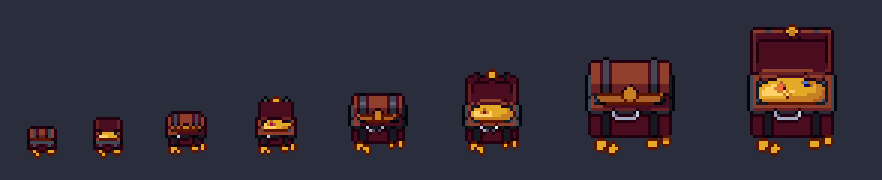
- At 16x16, four things. The box, the lid, one band and the lock. The lock is one or two light pixels; the open chest is the lid’s dark inside and a stripe of gold. Draw it from the front: a turned chest at 16 px is noise.
- At 32, the bands and the handles. There is room for metal bands with a light edge, a lock with a keyhole, the curve of the lid.
- At 48 and up, the planks, the rivets, the coins spilling at its foot, and a turned chest.
Kinds of chests
The chest says how good the reward is. Four chests from the library, open:
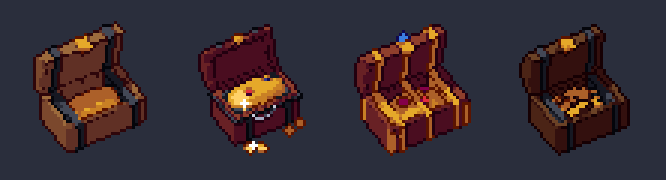
- A ladder of chests. Plain wood for common loot, red or iron for better, gold for the best. Players learn it in a minute, so keep the order the same all game.
- A lock in a strong colour. Gold or a blue gem: it is the detail the eye goes to, and it says chest at any size. Keep the same lock on every chest of one kind.
- Light inside. The open chest’s inside is the lightest part of the sprite, and a glow or a few sparkles on the gold make it the reward. Keep the wood in one ramp of browns, and the gold in its own.
A mimic
A mimic is the chest that bites. Shut, it is the plain chest the level uses; open, its lid is a mouth. The library’s mimic at 48 pixels, its bite loop:

- The same chest. Same size, same wood, same lock as a real chest, so the player cannot tell. A hint for the careful player, like a tooth showing at the seam, is fair.
- A dark mouth, light teeth. The inside is near black, the teeth a row of light pixels along both edges, the tongue in a strong colour no chest has. Two small eyes glowing under the lid, flat, one or two pixels each.
- Snap and hold. Gape wide, snap shut in one frame, hold for a moment: the timing of a bite (see animation timing).
Making chests with Pixor
Pixor renders a chest model’s opening in the same pixels, palette and light as your other sprites, at any size and from any side. The pictures above:
pxr render treasure-chest-pirate.glb --clip Open --sides 30 --preset selout --size 48 --sparkle 3 -o chest.png
pxr render treasure-chest-pirate.glb --clip Open --preset selout --size 16 --margin 0 -o chest-16.png
pxr render chest-trap.glb --clip Bite --sides 30 --preset selout --size 48 -o mimic.png- The chests are in the free library: a plain chest, a pirate chest, a golden chest, a coin chest, a sea chest and the mimic. In your own model, hinge the lid at the back edge and key its swing; the first and last frames are your closed and open chest.
--sides 30turns the chest so the lid’s swing shows;--view top-downdraws it for a top-down game.--size 16 --margin 0fills a 16x16 tile.--sparkle 3puts three four-pointed stars per loop on the shiniest pixels of the gold, each growing and shrinking over four frames.
Every setting is in the manual’s render settings.
Questions
How do you draw a chest in pixel art?
Start with a box a little wider than it is tall and a lid curved on top, then add two or three dark bands of metal across both and a lock in a bright colour at the front, where the lid meets the box. Shade the wood with two or three browns, lit from the same side as the level, and keep a dark outline round it like any prop. The lock and the bands are what say chest rather than crate.
How many frames does a chest opening animation need?
Four to eight, played once at about 12 frames a second. One or two frames of the closed lid jolting, two of the lid swinging up fast, one where it goes a little past open, and the open chest, held. Six frames is a good default; at 16x16 four are enough.
What size should a chest sprite be?
One tile: 16x16 in a game of 16 px tiles, 32x32 in a game of 32 px tiles. Next to a 32 px character a chest is about 24 to 32 px wide, a little bigger than a real chest would be, so the player sees it from across the room. A boss's reward chest can be one and a half times as big.
How do you draw a mimic chest?
Draw the same chest the level uses, so the player cannot tell it apart while it is shut, then open its lid as a mouth: a dark inside, a row of light teeth along both edges, a tongue in a strong colour and two small glowing eyes under the lid. Its bite is a loop of a wide gape, a snap shut and a short hold.
How do you make opening a chest feel rewarding?
Let the light out: the inside of the box is the brightest thing in the sprite once it opens, gold and white, with a few sparkles on the coins. Then show the reward: the item rises out of the chest and is held over it for a moment before it goes to the inventory. A short sound on the frame the lid hits its stop does the rest.