How to make a glow effect in pixel art
A glow in pixel art is not a blur. It is a few flat rings of colour: a small core near white, each ring outwards a step darker and more saturated on the same ramp, a dark surrounding to push against, and the glow's colour on the edges of whatever is close. Every pixel stays a colour of the palette, so the sprite keeps its crisp edges.
Glows are everywhere in games: power-ups, magic orbs, lanterns, energy shields, lasers, eyes in the dark. In a painting a glow is a soft gradient. Pixel art has no soft gradients, so the glow is built from what it does have: a few colours, hard edges and contrast.
The four parts of a pixel-art glow
- A dark surrounding. Light only reads against dark. A glowing orb on a pale sky hardly glows, the same orb in a cave does. Darken what is behind or around it first.
- A small core. The lightest colour of the glow’s ramp, close to white but tinted, where the light is strongest. Keep it small: a big white area reads as a flat white shape, not as light.
- Flat rings stepping down the ramp. Around the core, two to four bands, each a step darker and more saturated, ending a little darker than the core but still lighter than the surroundings. Hue-shift the steps (white, cyan, blue for magic; white, yellow, orange, red for fire), as in hue shifting.
- Light on the neighbours. The edges of whatever is close and faces the glow take its colour: the rim of the lamp’s cage, the hand under the torch, the floor under the crystal. This sells the glow more than any halo.
What to leave out: a soft brush, a layer’s outer glow, a Gaussian blur, a dark outline around the light. All four add colours that are not on the ramp, or a hard border light does not have. If you need a softer edge, use an ordered dither between two rings, a pixel wide.
Rings across the glow: the falloff
Below is the power orb from the free library, rendered three times by Pixor at 64 pixels. Only the glass glows; nothing else changes.

- Left, shaded as lit. A glowing material that is simply shaded by the key light: it never goes into shadow, but the light comes from the top left like on any surface. Right for a lamp’s glass seen from the side, wrong for a ball of energy.
- Middle, light from the core. The top of the ramp where the surface faces you, stepping down in even rings to its silhouette: the classic orb, sun or fireball.
- Right, light at the rim. The other way round: dark in the middle, brightest at the edge. That is how a bubble, a shield, a portal’s ring or the edge of a nebula looks, because you look through more of it at its edges.
Shields, force fields and beams: see-through light
A shield bubble is light you can see through. Drawn as a solid glowing shape, it hides what it protects. In pixel art the answer is a dither: the shield’s 1 px edge drawn whole in its brightest colour, the rest a scattered pattern of its light, denser towards the edge, and what is inside showing between those pixels, a step lighter because the shield lights it.
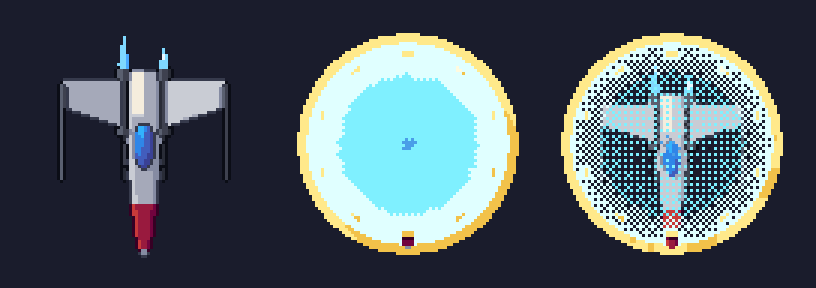
On the right, the shield never blends: every pixel is a colour of the shield’s ramp or of the ship’s. Where nothing is behind it, nothing is drawn, so the background (space, the ground) shows through. A beam or a force field works the same way.
Animated glows: pulse and flicker
A glow that never changes looks painted on. Three cheap ways to make it breathe:
- Pulse the rings. Grow the core by a pixel and shift every ring outwards for a frame or two, then back. Four to six frames are enough for a slow pulse.
- Cycle the colours. Keep the shapes and rotate the ramp’s colours through them, as in colour cycling: a few frames, no new pixels.
- Flicker. For fire and old lamps, change one ring at random by a step for a single frame. Regular flicker reads as a pulse, irregular as fire.
The library sprites at the top of this page each have a pulse of their own.
Glow in Pixor
Pixor draws glows from a 3D model the way the steps above describe, and nothing is ever blended:
- A glowing material is one with an emission in the model file (glTF or FBX). It takes the brightest shade of its ramp whatever the light, and with an emission map only the pixels the map lights glow, so a lamp’s glass glows and its post does not. Lines usually look wrong around light:
--no-lines MATERIALdraws none around it. - Glow falloff (
pxr.glow_falloffon the material, −1 to 1) gives the rings of the picture above: above 0 from the core out, 1 down every lit step of the ramp and 0.5 half of them; below 0 brightest at the rim. Each ring’s edge is a narrow ordered dither fixed to the surface. Details are in what a model file can say. - See-through glows: a glowing material that is also see-through (
pxr.see_through, 0.9 for a faint field, 0.5 for a thick one, or the file’s alpha blend) is drawn as light, as in the shield picture: energy, see-through glows. - Your own colours:
--material-ramp "Magic glow=#3a1a5e,#7a3ab8,#c070f0,#ffe8ff"swaps the glow’s shades, darkest first, and the rings go through them. - Pulses come from the model’s own clip (its emission keyed) or a colour cycle:
--cycle MATERIAL --colour-cycle 8. - For the engine’s bloom, export an emission map with the sheet:
--export png,emissionwritesname_emission.png, each glowing pixel in its own colour and transparent elsewhere, to draw additively or feed to a bloom pass.
pxr render orb.glb --preset selout --size 64 --clip none --export png,emissionNext
- Colour cycling: moving light from a fixed sprite.
- Explosion sprite sheets: fire and flashes, frame by frame.
- Normal maps for 2D: let the game’s own lights move over the sprite.
Questions
How do you make something glow in pixel art?
Give it a small core of the lightest colour of its ramp, then two or three flat rings around it, each a step darker and more saturated, and keep what is around it dark. Add the glow's colour on the nearby edges that face it. Never use a soft brush or a blur: they add colours between the pixels.
Why does my pixel art glow look blurry?
Because it was made with a soft brush, an outer glow layer style or a blur filter. Each adds dozens of in-between colours, which read as out of focus at 1x. Replace them with two to four flat bands from the glow's ramp, or an ordered dither between two of them.
What colours should a glow use?
One ramp, hue-shifted: the core almost white with a tint, the rings getting more saturated and moving towards a deeper hue as they darken (yellow to orange to red for fire, white to cyan to blue for magic). The background or the object around it should be darker than the outer ring.
How do I make glowing eyes in pixel art?
On a dark face, one or two pixels of the brightest colour for each eye, and at most a pixel of the glow's middle colour beside or under them. At game size the contrast does the work; a halo bigger than the eye turns into a smudge.
Should I use bloom in the game engine instead?
You can add it on top, but keep it small and at the game's pixel resolution, or it smears across the grid. Many pixel-art games draw the glow in the sprite and add only a soft light or an additive layer from an emission map.