How to draw pixel art eyes
Pixel art eyes are drawn, never shaded: a dark shape and one light pixel for the glint on most sprites, a single pixel on the smallest, a light eye with a dark pupil on a dark face, and an iris with two glints only on a big cute face. Both eyes are the same size, on the same row, and stay put while the character moves.
A face reads first by its eyes, and at sprite sizes an eye is only a few pixels. Pixel artists do not paint eyes the way they paint the rest of a character: no light and shadow, no outline, no soft edges. An eye is a small flat shape, chosen for the sprite’s size and the character, and placed to the pixel.
Eyes at each size
| Sprite height | What the eye is |
|---|---|
| 8 to 16 px | one dark pixel, or the darkest colour of the face |
| 16 to 32 px | a dark 1x2 or 2x2; on a 2x2, one light pixel top-outer as the glint |
| 32 to 48 px | a dark 3x3 or 3x4 with its glint; still no white on most characters |
| 48 px and up | a round dark eye with an iris a few shades lighter, a 2x2 glint high and a smaller one low on the other side |
A good rule of thumb is a twelfth of the sprite’s height. The picture shows the library slime rendered by Pixor at 16, 24, 32, 48 and 64 pixels: a pixel, then a dark pill with a glint, then at 64 px a round eye with an iris and two glints.

Eyes for each kind of character
- Cute animals and mascots: big, round, dark, with a glint. The highest-contrast eye a sprite can have.
- People: small and dark, under the brow; from about 32 px the top row a pixel longer on the outer side, as a lid or lashes.
- Dark fur, dark skin, dark shells: a light eye with a dark pupil, or the eye disappears into the face.
- Menacing creatures: narrower, a slanted lid, a glow with no glint, or a slit.
- Cats, snakes, dragons: a light or glowing almond with an upright dark slit, once the eye is three pixels wide.
- Robots: a glowing visor bar, or glowing dots.
- Spiders and insects: clusters of one-pixel dots, or big dark eyes with one highlight.
- Glowing bodies (a wisp, a fire spirit): dark eyes. A glow on a glow does not show.

Views: front, three-quarter, side, back
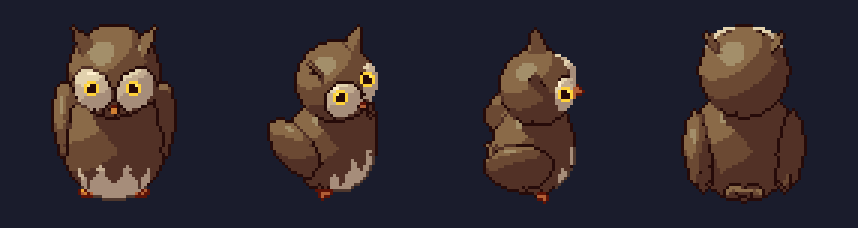
From the front both eyes are the same size and on the same row, with their glints mirrored. Turned three-quarter, the far eye is narrower and nearer the nose, and both pupils look the way the head turns. In profile only the near eye shows, as a whole eye a pixel in from the face’s edge. From behind there is no eye at all.
Expressions with a pixel or two
Open, shut (a blink), sleepy, happy arches, angry (the top inner corner cut), sad (the top outer corner cut), surprised (a pixel taller) and hurt crosses. A blink is one or two frames shut in a loop of eight or more, with the open frames held longest.


Common mistakes

- Shading the eye. A lit sphere gives a crescent, a cross or a smudge at sprite size (first slime). An eye is flat.
- Googly whites. A big white with a one-pixel pupil stares (second slime). On a small sprite the eye is dark, or light with a pupil of at least two pixels.
- Too big, too flat. Squares with no glint read as holes (third slime).
- An outline round the eye. It turns the eye into a ring.
- Eyes that differ. One a pixel higher, wider or with its glint on the other side: the face looks broken.
- Eyes that move on their own. In an animation an eye that slides or jumps a pixel while the head stays still reads as a twitch. Eyes move with the head and nothing else.
Eyes from a 3D model in Pixor
Rendered from 3D like any other surface, eyes make every mistake above. Pixor draws them instead: mark the eye material, and wherever the model’s eye shows, the Eyes pass draws a pixel artist’s eye for that size, sized and placed over the whole animation so it never jiggles.

-
Mark the eyes. In Blender, tick Eye in the material’s Pixor panel (the add-on); in a glTF file,
extras.pxr.eye: trueon the material; in FBX, a user propertypxr_eye. Or name it on the command line:--eye "Eye black". Give each eye its own small sphere standing a little off the face. -
Choose the style, or let Pixor. By default (
auto) a glowing material brighter than the face glows, a light material on a darker face is a light eye with a pupil, and anything else is a dark eye with a glint. Say it on the material in the add-on’s Eye style, or in the file asextras.pxr.eye_style("white","slit:2:4"), so the model carries its look; or on the command line, per material:pxr render owl.glb --size 64 --eyes "Eye yellow=white" pxr render dragon.glb --size 64 --eyes "Dragon eye=slit:2:4" pxr render robot.glb --size 48 --eyes "Visor=visor" pxr render villager.glb --size 64 --eyes "dark:1:3:none:aspect=0.7:lid=on"The styles are
dark,white,glow,dot(a bead, never more than 2 px),slitandvisor. After the style come the smallest and biggest height in pixels and where the glint goes (outer,inner,middle,none), then settings such aslid=on(a person’s eye),iris=N(a dark eye this wide gets an iris and two glints; 0 never),gaze=(where a pupil looks:facingthe way the model faces, the default;ahead,centre,left…) anddark=,light=,shine=(#rrggbb,ink,paper). -
Expressions.
--eyes mood=angrygives every frame one expression. For a single frame or part of a clip,--blink Idle@5shuts the eyes on frame 5 of Idle, and--eye-mood Attack@2=angrychanges them from frame 2 on (openends it). In a project these are frame events namedeyes:blink,eyes:happy… They drive the eyes and are not sent to your game with the other events.pxr render slime.glb --size 48 --clip Idle --blink Idle@5 --export png,gif -
Check from every side.
pxr render model.glb --ring 8 --clip alldraws every side; look at the eyes zoomed in, from the front, three-quarter and side. If a model’s eyes should be shaded after all (a statue’s stone eyes),--no-eyesturns the pass off.
Every setting is also on the Eyes node of the Style graph in the app, and in what a model file can say.
Next
- Sprite sizes: what fits at 16, 32 and 64 pixels.
- Pixel art glow: glowing eyes and everything else that glows.
- Walk cycles: a whole character in motion.
Questions
How big should eyes be in pixel art?
About a twelfth of the sprite's height: one pixel on a 16 px character, a 1x2 or 2x2 on a 32 px one, 3 to 4 pixels on 48 to 64 px sprites. Only a big cute face or a portrait has room for a white, an iris and two glints.
How do you draw small eyes in pixel art?
As one dark shape with no outline and no shading: a single dark pixel at 16 px, a 2x2 with one light pixel in its top outer corner as the glint at 32 px. The two eyes mirror each other and sit on the same row.
Should pixel art eyes have whites?
Not on small sprites: a white with a one-pixel pupil reads as a staring, googly eye. Use a dark eye with a glint on a light face, a light eye with a dark pupil of two pixels or more on a dark face, and whites with an iris only from about 48 px on cartoon characters.
How do you draw eyes in a side view or from behind?
In profile only the near eye shows, a pixel in from the edge of the face, as a whole small eye rather than a sliver. From behind no eye is drawn, even where a bulging eyeball would peek over the head.
How do you make pixel art eyes expressive?
With a pixel or two: a horizontal line for shut or blinking, arches for happy, the top inner corner cut for angry, the top outer corner cut for sad, a pixel taller for surprised, and crosses for knocked out. The rest of the face can stay the same.
Why do the eyes of my 3D-rendered sprite look wrong?
Because a renderer shades an eye like any other surface: light bands cut it into a crescent, a cross or a smudge, the outline rings it, and it slides by a pixel as the head moves. Pixor draws a pixel artist's eye where the model's eye material shows instead, keeps its size through the animation and moves it only with the head.