How to draw a pixel art portal
A pixel art portal is a frame (a stone arch, a ring of light, a ring on the floor) around a dark face with a bright spiral turning in it. The frame stays still; only the spiral moves, on a seamless loop of six to twelve frames. Three or four arms make the loop short: a third of a turn and it is back where it began.
Portals are in every kind of game: the door at the end of a level, a teleporter between two rooms, the rift enemies pour out of, the gate to the last world. A portal is a prop that is half light: a solid frame that stands in the level, and a face of swirling light that is the animation.
The loop
Here is the free library’s rift, a ring of light floating over a rock, at 64 pixels: all eight frames of its loop, drawn by Pixor.

- The frame stays still. The ring and the rock are the same on every frame. Only the spiral moves, so the portal does not wobble.
- A dark face. The inside is darker than anything around it, black or the darkest step of the portal’s colour. The spiral is light on dark: it reads at any size.
- Two to four arms. Each arm is thin at the centre, thickest halfway along, and thin again at the tip. With three arms the loop only has to turn a third of a circle: here 8 frames, 15 degrees each.
- Round in its plane. Draw the spiral round and let the frame give the shape. An oval spiral turned frame by frame changes shape and pokes out of its frame.
A gate portal
A portal the player walks through is a door: an arch of stone, metal or wood, and the light filling the doorway. The library’s stone gate at 96 pixels, four frames of its loop:
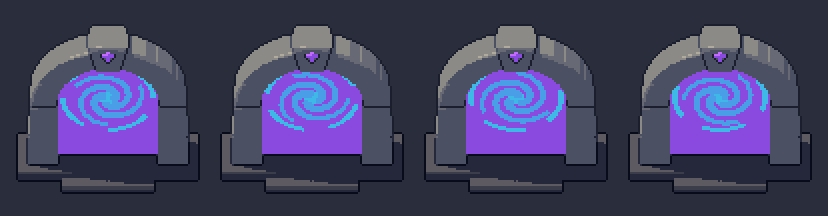
- The arch is a prop. Shade it and outline it like any other stone, lit from the same side as the rest of the level.
- The light fills the doorway to its edge, and lights the inside of the arch. A gem or a rune in the frame, in the portal’s colour, says the two belong together.
- Bigger than the player. A door is about 1.5 times the height of the character who walks through it: 48 px for a 32 px hero. Keep the sprite sizes of the level in mind.
Colours
A portal’s colour tells the player where it leads. The same rift in four colourways: the blue and purple of magic, fire, nature and the void.
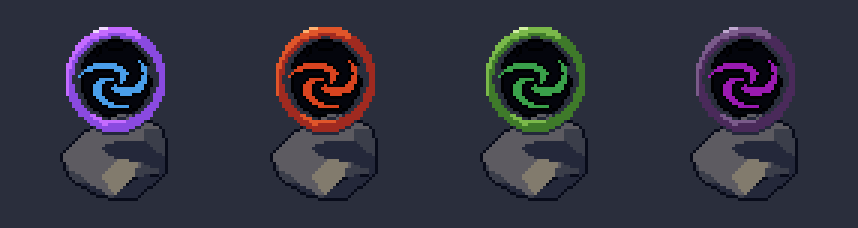
- Two ramps. One for the spiral, light and bright, and one for the ring, darker and less saturated. Four steps each, hue-shifted: the light steps warmer, the dark ones cooler.
- The face stays dark in every colourway; only the spiral and the ring change.
- Light around it. On a dark level, a soft glow on the floor and the walls in the spiral’s colour makes the portal light the room. Colour cycling can turn a still spiral, the way old games did.
Making portals with Pixor
Pixor renders a portal model’s loop in the same pixels, palette and light as your other sprites, from any side. The pictures above:
pxr render portal-small.glb --clip Swirl --preset selout --size 64 -o rift.png
pxr render portal.glb --clip Swirl --preset selout --size 96 -o gate.png
pxr render portal-small.glb --clip Swirl --preset selout --size 64 --material-ramp "Magic glow=#7a1a1a,#d8441f,#ff9a2e,#fff0b0" --material-ramp "Arcane glow=#5a1a1a,#a02a20,#e0552a,#ffb070" -o rift-fire.png- Both portals are in the free library, with a teleporter pad and a summoning circle. In your own model, spin the spiral on its own and keep the frame still; a spiral of three arms needs a third of a turn for a seamless loop.
--material-rampdraws a material with your own shades, dark to light: one model, as many colourways as you have worlds.pxr inspect portal-small.glblists the material names.--ring 8renders the portal from eight sides for a top-down or isometric game; the spiral turns the same from every side.
Every setting is in the manual’s render settings.
Questions
How do you draw a portal in pixel art?
Draw the frame first: an arch, a ring or a circle on the floor, in the colours of the world it stands in. Fill it with a face darker than anything around it, then draw a spiral of two or three light arms on that face, lightest at the middle. Leave the frame still and animate only the spiral.
How many frames does a portal animation need?
Six to twelve, looped at 8 to 12 frames a second. A spiral of three identical arms only has to turn a third of a circle before it looks the same again, so a short loop is seamless; two arms need half a turn, one arm a whole turn.
How big should a portal be?
A door the player walks through is a little taller than the player: about 1.5 times a 32 px character, so 48 px, with its frame. A rift or an enemy spawner floating in the air can be 24 to 32 px; a boss gate fills the screen's height.
Should a portal have an outline?
Its frame does, like any prop: stone, metal and wood keep their dark outline. The light inside has none, or an outline in its own darkest colour, so it reads as glowing rather than painted on.
How do I show where a portal leads?
With its colour: blue and purple for magic, red and orange for a fire world or hell, green for a forest or poison, violet and black for the void. The same portal in several colourways tells the player which world is behind each one.