How to draw a pixel art meteor
A pixel art meteor is a small dark rock with a long fire tail behind it, falling on a diagonal and drawn in place on a loop of four to six frames; the game moves it. Where it lands, a second sprite plays once: a frame of white flash, a blast of fire, a ring thrown out along the ground, then rocks and smoke settling into a crater.
Meteors are a spell in every RPG, a hazard in survival and tower defence games, a boss attack and a background detail in a night sky. A meteor is two sprites: the rock falling with its fire trail, and the strike where it lands. The first is small and loops; the second is big and plays once, and it carries most of the weight.
The falling meteor
The meteor itself is drawn in place, on a short loop, and the game moves it along its path. Here is the free library’s meteor falling to the right at 56 pixels, all six frames of its loop, drawn by Pixor:

- A dark rock at the head. The rock is the darkest thing in the sprite, with a dark outline and a few glowing cracks or spots. Light it from behind: the side the fire touches takes yellow and orange, the front stays dark.
- A long tail, lightest at the rock. Three or four times the rock’s length: white and yellow where it leaves the rock, then orange, then dark red at its ragged tip. The tail has no outline; it tapers to one or two pixels.
- Only the tail moves. The rock keeps its size and place in every frame, so the meteor does not wobble as it flies; the tail flickers, splits into two tongues on one frame, joins up on the next.
- One angle. Draw it on the angle the game moves it. Turned freely by the engine, the pixels break up; if it falls at several angles, draw two or three versions.
The impact
The strike is a sheet of its own, played once where the meteor lands. Here, one sheet from Pixor: the meteor falling in from the top left, the flash, the blast, the ring thrown out along the ground, then the rocks and smoke settling.
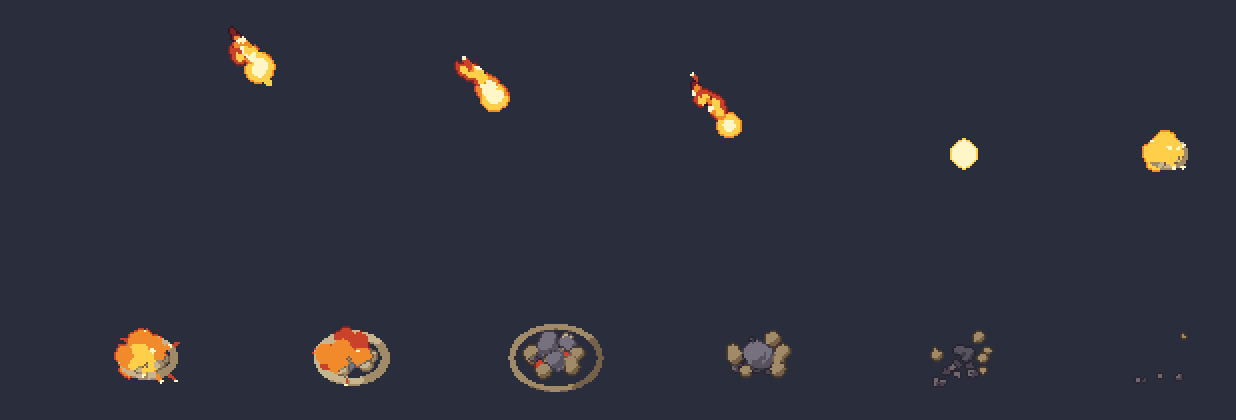
- The flash. One or two frames of a plain, light shape where it touches: nearly white, no shading. It hides the frame where the meteor disappears.
- The blast. Three or four frames of fire, as an explosion grows: yellow and white in the middle, orange and red at the edge, the light colours going first.
- The ring. A flat ellipse of dust running out along the ground past the blast. In a top-down or three-quarter view it is what makes the strike feel heavy: it shows the size of the area it hits.
- Rocks and smoke. Grey rocks thrown up, then falling back and breaking up into specks, and a smoke puff that hangs longest. The last frames can be left as a crater on the ground.
A spell that drops many meteors plays the same strike at a few spots, a few frames apart, rather than one giant one.
Colours
A meteor is fire most of the time, but the same fall works for any element: a magic star, an ice comet, a poison rock. The same falling fireball, drawn in place on a diagonal in four ramps:
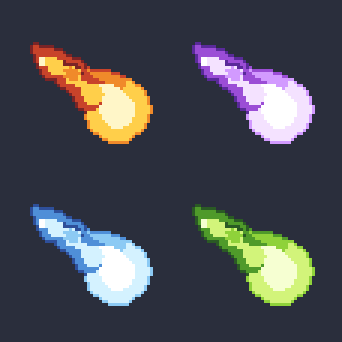
- Three or four steps of one ramp for the fire, hue-shifted: warm white, yellow, orange, dark red. Keep the rock out of that ramp: dark brown or grey, so it reads as solid.
- Light at the front. The lightest pixels are where the meteor is; the trail cools and darkens behind it.
- Lighter than the night. A meteor crossing a dark sky needs its darkest step lighter than the sky, or the tail’s tip vanishes; one crossing a bright sky needs the opposite. Add a soft glow only if the background is dark.
Making meteors with Pixor
Pixor draws both sprites, in the same pixels, palette and light as your models. The pictures above:
pxr render meteor.glb --clip Burn --sides 90 --preset selout --size 56 -o meteor.png
pxr effect "fireball:12,size=3,path=-2.4,3.2,0:0,0,0>explosion:8@land,size=1.4>ground-slam@land>smoke-puff@land+3" --preset selout --size 96 -o strike.png
pxr effect "fireball:8,axis=1,-1,0,size=1.6,ramp=frost" --preset selout --size 48 -o ice-meteor.png- The meteor model is in the free library: a rock, its glowing cracks and three layers of flame, with a burning loop.
--sides 90draws it from the side, falling to the right; render more sides for a top-down game. - The strike is a recipe:
>chains effects,@landstarts one where the path before it ends,+3three frames later.path=is the fall, in metres from where it starts. - A fireball drawn in place takes
axis=for the way it falls andramp=for its colours:fire,magic,frost,poison… or your own#rrggbbcolours, dark to light.
Every setting is in the manual’s pixel effects.
Questions
How do you draw a meteor in pixel art?
Draw a dark, lumpy rock and a fire tail three or four times its length streaming back from it, on a diagonal. The rock keeps a dark outline and a few glowing cracks; the tail has no outline and goes from white and yellow at the rock to orange and dark red at its tip. The side of the rock facing the fire is lit by it.
How many frames does a meteor animation need?
Four to six for the fall, looped at 10 to 12 frames a second: the rock stays put in the cell and only the tail changes shape. The impact plays once on 8 to 14 frames: one frame of flash, three or four of blast, then the ring, the debris and the smoke fading.
What angle should a meteor fall at?
Steeper than 45 degrees reads as falling, shallower reads as flying past. A strike aimed at a spot on the ground falls at 50 to 70 degrees; a meteor crossing a night sky in the background can be nearly flat. Draw the tail on the exact angle the game moves it, or it looks like it slides.
How do you make a meteor impact feel heavy?
Make the hit bigger than the meteor: a flash two or three times its size, a ring that runs out along the ground past the blast, rocks thrown up and falling back, and smoke that hangs longest. Add a few frames of screen shake and leave a crater or scorch mark behind.
What is the difference between a meteor, a comet and a fireball?
In a game, a meteor is a rock on fire falling to the ground and hitting it; a comet is a bright head with a long pale tail crossing the sky, and it never lands; a fireball is a ball of flame with no rock inside, thrown by a hand or a staff.