A pixel-art explosion sprite sheet
Explosions are one of the hardest effects to animate by hand: a flash, a fireball that swells and cools, smoke that rolls out. Pixor draws them from 3D particles, through the same look as your sprites, so they belong in the same game.

What makes an explosion read
A pixel-art explosion that reads well at game speed has a few parts, in order:
- A flash. One or two frames of the palette’s lightest colours, small and bright. It tells the player where the hit happened.
- A fireball that swells quickly, from yellow through orange to red as it cools.
- Smoke that rolls out and darkens, with the last of the fire showing through.
- Sparks or debris thrown out at the start, a pixel or two each.
Drawn by hand that is a dozen frames of shapes that must grow, overlap and change colour without jumping. Most hand-drawn explosions cheat with fewer frames and flat shapes, and most explosions made in a particle tool and shrunk down come out as soft blobs with hundreds of colours, which is the opposite of what a pixel-art game wants.
Make one in Pixor
With no model at all, one line makes the sheet:
pxr effect explosion:12 --preset selout --size 64 --export gif,json -o explosion.png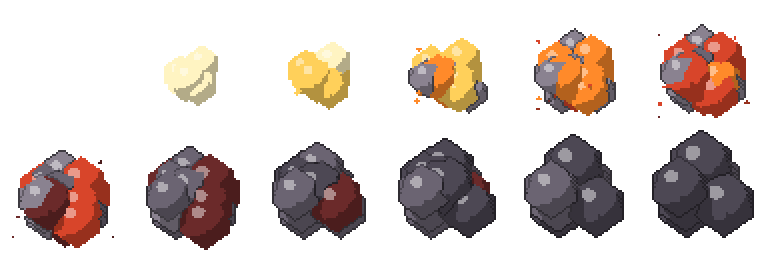
That writes explosion.png, a sheet of twelve 64×64 frames, its JSON with each frame’s place and timing, and a GIF to check it. In the app, the empty project’s screen has Make an effect beside Import… and Browse free models.
The explosion is made of 3D particles, rendered through the same pipeline as a model: light bands, a hue-shifted ramp per colour, the palette, the lines. So it takes the look you give it: --preset selout draws the coloured outlines of the selout look, --palette my-game.hex puts it on your palette, and a project’s own Style makes it match your sprites exactly.
Change it
The explosion has the settings of any Pixor effect:
- Frames: the number after the colon,
explosion:8for a quick pop,explosion:16for a slower one. - Size:
--sizeis the frame in pixels. The explosion above is 64; 32 or 48 suit most enemies. - Energy (
--effect-energy) for how strong it is, the size of the effect itself in the scene (--effect-size) and where it is (--effect-at X,Y,Z). - Seed (
--effect-seed): the same seed always gives the same pixels. Render seeds 1, 2 and 3 for three explosions that are not copies of each other.
On an enemy
An explosion usually happens to something. Add it to a model as an action of its own:
pxr render spaceship.glb --view top-down --size 64 --clip none \
  --effect explosion:12 --effect-hit 2 --export json -o ship.png
In the app, add it in the Scene step with + in the Outliner, under Effects. It becomes an Effect node of the Scene graph and an action named fx-explosion, with its own row on the sheet. Its diamond can be dragged in the 3D view to place it.
Three settings make it fit the moment:
- Follow a bone: a muzzle flash at the end of a gun, a blast from a hand.
- Play over a clip (
--effect-clip): the explosion plays while the model does something, such as a ship breaking apart. - Effect only (
--effect-alone): draw the explosion without the model, as its own layer, aligned with the character’s sheet. The game plays it on top of whatever sprite is there.
Hit frame (--effect-hit 2) marks the frame that lands the hit. The JSON lists it under meta.pixor.hits, so the game can shake the camera, deal damage or play the sound on exactly that frame.
Smoke from a simulation
Pixor’s own explosion is quick and needs nothing else. For a heavier blast, add a volume of smoke carried by the explosion’s emitter: --effect explosion --volume puff:1.5@effect:1. A .vdb simulation from Blender, EmberGen or Houdini works in the same place and is drawn in the same bands; see fire, smoke and water from VDB.
The other effects
The same command makes the rest of a game’s effects: hit-spark, slash, magic-burst, heal, portal, smoke-puff, dust, fire-loop, rain, snow, fireflies and falling-leaves. A fire-loop loops for torches and burning wrecks; hit-spark and slash are short, for every hit in a fight. For an enemy that should break or burn away rather than explode, see the death effects tutorial. Every option is in the manual.
Questions
How many frames should a pixel-art explosion have?
Eight to twelve at 12 frames a second for a normal hit; small ones such as a bullet impact can be four to six, and a boss's death can run longer. Pixor's explosion is 10 frames unless you give a number, as in explosion:12.
Can the explosion use my game's palette?
Yes. It is rendered through the same Style as a model, so --palette with a .hex, .gpl or .png file, or a project's own look, puts every pixel of the explosion on those colours.
Will the same command give the same explosion every time?
Yes. The particles come from a seed: the same seed and settings always give the same pixels. Change --effect-seed for a variation, so a game can have three explosions that are not copies of each other.