How to draw a pixel art laser beam
A pixel art laser beam is a straight line of two or three flat colours: a core near white, a rim of the laser's colour on each side, and nothing soft around it. What makes it read as a laser is the timing: it reaches its full length at once, holds for a few frames, thins to a single pixel of its colour and is gone.
Lasers show up in every kind of game: a tower’s beam in tower defense, a ship’s cannon in a shoot ’em up, a boss sweeping the arena, a security grid in a stealth level. They are also one of the easiest effects to get wrong in pixel art, because the instinct is to paint light with a soft brush. A pixel-art laser has hard edges and very few colours; the light comes from contrast and timing.
The parts of a laser beam
- The core. One pixel wide on most sprites, the lightest colour of the beam’s ramp: white with a tint, never pure white over a large area.
- The rim. A pixel of the laser’s colour on each side of the core, a step darker and more saturated. This is what says “blue laser” or “red laser”; the core alone just says “bright”.
- The start and the end. Where it leaves the barrel, a pixel or two of the core over the muzzle sells that it comes out of the gun. Where it hits, a small burst of the same colours (see explosion sprite sheets) is better than letting it stop flat.
- What it lights. The barrel’s tip and anything the beam passes close to can take a pixel of the rim’s colour. As with any glow, the neighbours do more for the light than a halo.
Leave out: a soft outer glow, a gradient across the beam, an outline around it. Each adds colours between the pixels, and at game size the beam goes out of focus.
The frames of a shot
A laser reads as a laser because of how it moves. Below is the sci-fi turret from the free library firing a beam, rendered by Pixor at 64 pixels, seen from the side. Six of its ten frames, left to right and top to bottom:
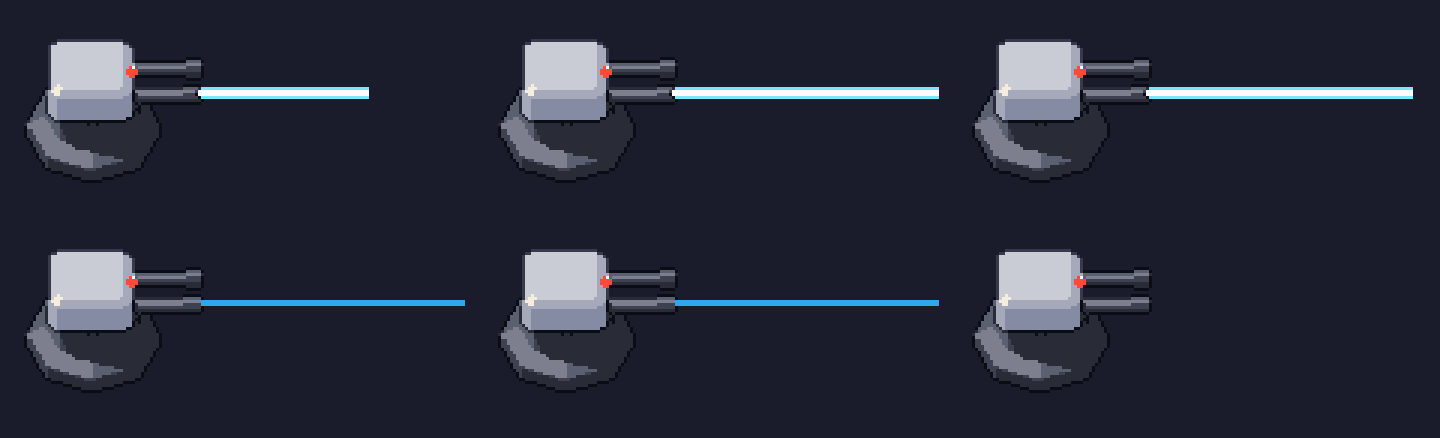
- Fire out. On its first frame the beam already covers much of its length. A laser that grows slowly, pixel by pixel, reads as a stream of liquid.
- Hold. Two to five frames at full length and full width: core and rim. A flicker of a single pixel at the core’s end, or the core one frame shorter, keeps it alive without moving it.
- Thin. A frame or two of one pixel in the rim’s darker colour, the whole length at once. This is the after-image, and it is what makes the shot feel fast.
- Gone. An empty frame before the next shot, or the gun’s idle.
At 12 frames a second, ten frames is under a second. For a rapid-fire gun, keep only fire, one hold and thin.
Width per sprite size
| Sprite size | Beam while firing | Thin frames |
|---|---|---|
| 16–24 px | 1 px core, no rim (or 1 px of colour) | 1 px of a darker colour |
| 32–64 px | 3 px: 1 core, 1 rim each side | 1 px |
| 96–128 px | 5 px: 1–3 core, 1–2 rim | 1–2 px |
| boss lasers | 7 px or more, the rim in two steps | 3 px, then 1 |
Keep the beam no wider than the barrel it comes out of: a wider beam looks like it is being pushed by something else.
Colours
Use three steps of one ramp, hue-shifted the way light is: the core towards white and warm, the rim saturated, the thin frames a deeper, cooler step. The same turret and the same frame in four ramps:
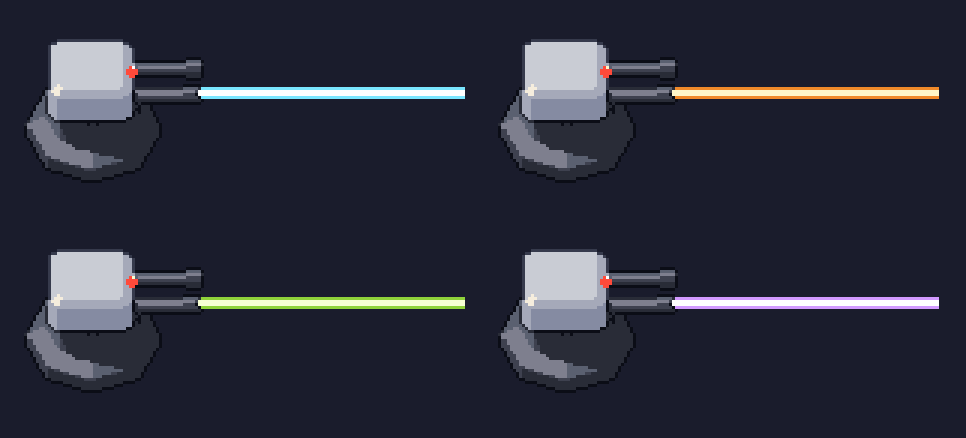
Cyan and blue read as energy and science fiction, red as hostile or military, green as alien, poison or acid, purple and pink as magic. In a game with many lasers, give the player’s one colour and the enemies’ another, and keep every beam’s ramp in the game’s palette.
Diagonal beams and turrets
A beam at an angle is a pixel-art line: even steps, one across for one down at 45 degrees, two across for one down near 27 degrees, and the core never broken by a step. Rotating a horizontal beam sprite in the engine does the opposite: the steps come out uneven and the core doubles or disappears.
For a turret that aims, the usual answer is a frame per heading, as in tower defense sprites: 8 or 16 headings, the beam drawn for each. Here is the turret firing from a tower defense camera, 35 degrees down, at two headings:

Seen from above, a beam aimed towards the camera is shortened and wide; one aimed away is long and thin. Both are right: draw the beam each heading actually gets, not one beam turned round.
Making a laser beam with Pixor
Pixor draws the beam as an effect over the model, in the same pixels as the rest of the sprite. Beam fires out over its first frame, holds, thins to a pixel of its colour and is gone, and it turns with the part that fires it, so a turret sheet at 16 headings gets the right beam on every one. The pictures on this page come from one command each:
pxr render turret.glb --clip none --sides 90 --size 64 --effect "beam:10,node=Turret guns,axis=forward,length=2,ramp=energy,fit"beam:10is a shot of ten frames,length=2its length in metres andramp=its colours (energy,fire,poison,magic,lightning… or your own#rrggbbcolours, dark to light).node=is the part it rides andaxis=forwardthe way it points, so it leaves the barrel and turns with it.fitlets the sheet’s cells grow to hold the whole beam; without it the beam is cut at the cell’s edge.light=1.5makes the beam light what is within 1.5 metres while it fires, the barrel’s tip and the ground under it.
On a clip of your own, --effect "beam@Fire:Muzzle+2,axis=+z,length=3,ramp=energy" fires it from the bone or part Muzzle on frame 2 of the clip Fire, and the clip keeps its frame count. to=Target pins the beam between the emitter and another node (a tractor beam, a chain between two towers), and --ring 16 renders the turret and its beam at sixteen headings with their JSON, as in tower defense sprites. Every setting is in the manual’s pixel effects.
Questions
How wide should a pixel art laser beam be?
For sprites of 32 to 64 pixels, three pixels while it fires (a one-pixel core with a pixel of rim on each side) and one pixel as it fades. A big boss laser or a 128-pixel sprite can go to five or seven, with a two-pixel core. Wider than the gun's barrel looks like a pillar, not a beam.
What colours should a laser beam use?
Three steps of one hue-shifted ramp: a core that is almost white with a tint, a light rim, and a darker, more saturated colour for the thin fading frames. Cyan and blue read as energy, red as hostile or military, green as alien or poison, purple as magic. Keep the background or the tile under it darker than the rim.
How many frames does a laser shot need?
Four to ten. One frame to fire out to its full length, two to five holding (the core can flicker by a pixel), one or two thinned to a pixel of its colour, then gone. At 12 frames a second that is a third to two thirds of a second, which reads as a shot rather than a stream.
How do I draw a diagonal laser in pixel art?
As a clean line with even steps: at 45 degrees one pixel across for one down, at about 27 degrees two across for one down. Keep the core and rim the same thickness along the whole line and never let a step break the core. For any angle, draw the beam once per heading, as a turret sheet does, rather than rotating a horizontal beam.
Should a laser be a sprite or drawn in the engine?
Both work. A beam of a fixed length can be frames of a sprite sheet, like the turret's here. A beam whose length depends on where it hits is usually a short sprite stretched along its length only (nearest-neighbour, so the core stays a pixel wide), or three pieces: a muzzle, a middle that repeats, and an impact.