Tower defense sprites: turrets, enemies and shots
Tower defense sprites are the towers that aim, the enemies that walk the path, and the shots and hits between them. The tower is the special one: its turret turns to face its target, so its sprite sheet holds one frame for each heading, usually 16, all turning about one fixed pivot so the gun never jumps on its base.
What a tower defense game needs
A tower defense game has a short list of sprites, but most of them come in many directions:
| Sprite | Directions | Frames | Notes |
|---|---|---|---|
| Tower base | 1 | 1 | Does not turn; one picture per upgrade level |
| Turret (the part that aims) | 16 (8 to 32) | 1 idle, 3 to 8 to fire | All on one pivot, the axis it turns about |
| Enemy on the path | 4 or 8 | 4 to 8 per walk | Plus a hurt flash and a death |
| Flying enemy | 8 or 16 | 2 to 6 per loop | Has no ground, so it needs a shadow of its own |
| Projectile | 1, or 8 to 16 | 1 to 6 | A ball needs one; an arrow or a rocket points where it flies |
| Muzzle flash, hit, explosion | 1 | 4 to 12 | Drawn once, played where the shot lands |
| Upgrades | as the tower | as the tower | Usually three levels: a recolour, then new parts |
Turrets and enemies are where hand-drawing gets slow: a turret at 16 headings with a six-frame shot is 96 frames, and every upgrade multiplies it. From a 3D model each heading is a render, so the cost is the model, not the frame count.
Pick the camera first
The camera decides how every sprite is drawn, so choose it before anything else, and use the same one for every tower, enemy and shot.
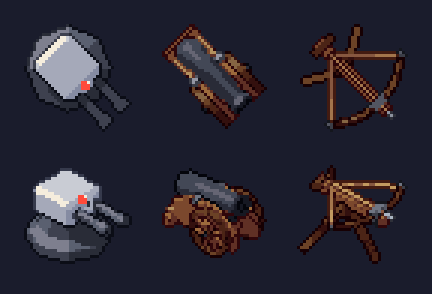
- Straight down (
--view top-down): flat, readable maps with many towers on screen. The turret’s round base is a circle, the barrel a line. Enemies seen from above need a clear silhouette. - Three-quarter (
--view three-quarter --pitch 35): the side of each tower shows, so a cannon looks like a cannon. Most tower defense games with characters use a slant like this one.
A turret sprite sheet at 16 directions
Render the turret with a ring of 16 sides. Every side shares one size and one scale, and turns about the same point:
pxr render turret.glb --preset selout --view three-quarter --pitch 35 --size 40 \
  --ring 16 --clip none --columns 8 --export png,json -o turret.png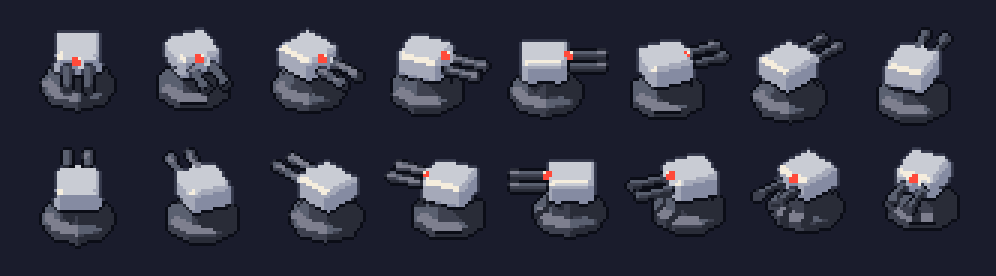
--ring 16 turns counter-clockwise from the front: the first frame (South) points down the screen, the fifth (East) to the right, the ninth (North) away from the player. The JSON names each frame with its compass side (South, SSE, Southeast…) and its angle in degrees, and gives every frame the same pivot, so placing the sprite on the tower’s tile at that pivot keeps the base still while the guns aim. --camera top-down-shooter is the straight-down version, 16 sides already.
To pick the frame in the game, measure the angle from the turret to its target, with 0 pointing down the screen and angles growing counter-clockwise, and take round(angle / 22.5) % 16. With the y axis pointing down the screen, as in most engines, that angle is atan2(dx, dy) in degrees, brought into 0 to 360.
When the base must stay still. A round base looks the same from every side, so turning the whole model is fine, as above. A square base or a building under the gun should not turn: render it once, and the turret alone on its own ring, from two models (or two items of one scene) and two cameras. The manual’s part sets show the whole recipe, a tank turret at 32 angles over a hull at 8.
Firing at every heading
Give the model a firing clip (a recoil, a flash, smoke) and every heading gets it, in one sheet with a row per side:
pxr render cannon.glb --preset selout --view three-quarter --pitch 35 --size 48 \
  --ring 16 --clip Fire --fps 12 --event Fire@1=shot --export png,json -o cannon.png
--event Fire@1=shot writes an event called shot on the second frame of every side in the JSON, so the game spawns the projectile on the frame the flash shows, not when the clip starts. The library’s cannon has a Fire clip of its own to try it with; the turret has a Turn.
Shots, hits and explosions
The shot and what it does when it lands are separate sprites the game moves and plays. Pixor draws them as pixel effects, on the same palette and lines as the towers:
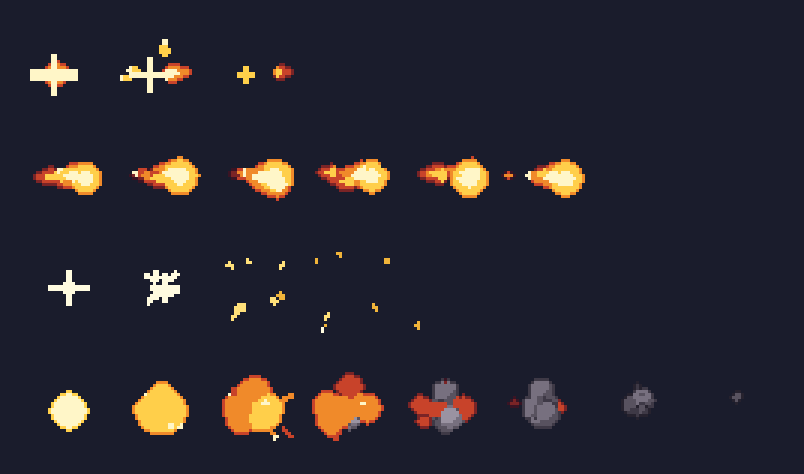
pxr effect muzzle-flash:4 --preset selout --size 32 -o flash.png
pxr effect fireball:6 --preset selout --size 24 --ring 16 -o fireball.png
pxr effect hit-spark:6 --preset selout --size 32 -o hit.png
pxr effect explosion:8 --preset selout --size 32 -o boom.png
A fireball flies along its own axis, so --ring 16 gives it 16 headings like the turret that shoots it. A cannonball needs one frame. For bigger blasts, the explosion sprite sheet guide goes frame by frame.
Enemies on the path
Enemies walk the path in four or eight directions, at one scale with the towers:
pxr render goblin.glb --preset selout --view three-quarter --pitch 35 --pixels-per-metre 20 \
  --ring 8 --clip Walk --smart-frames 6 --variant hit-flash --export png,json -o goblin.png
--pixels-per-metre instead of --size keeps true sizes: a goblin, a knight and a tank rendered at the same value stand at their real heights against each other and the towers. --smart-frames 6 keeps the six poses that matter in the walk (walk cycles), and --variant hit-flash writes the same sheet as a white flash for the frame a shot lands. A death is one more clip, or a dissolve or a break-apart made by Pixor: see death animations.
Upgrades without redrawing
A tower’s second and third levels are often the same tower in richer colours, then with more parts. The colours cost nothing from a model:
pxr render turret.glb --preset selout --view three-quarter --pitch 35 --size 40 \
  --ring 16 --clip none --material-colour "Hull=#c8a040" -o turret-gold.png
--material-colour repaints one material, its shades and lines following, so the gold turret keeps every heading of the grey one. New parts for the third level (a second barrel, a dish) go in the model, and the same line renders them.
Sizes that fit the path
| Path tile | Tower | Enemy | Projectile |
|---|---|---|---|
| 16 px | 16 to 24 px | 8 to 16 px tall | 3 to 6 px |
| 32 px | 32 to 48 px | 16 to 32 px tall | 6 to 12 px |
| 48 px | 48 to 64 px | 24 to 48 px tall | 8 to 16 px |
Small enemies need clear silhouettes and small, flat eyes, a pixel or two (pixel art eyes); sprite sizes has the size chart for the rest.
Next
- Car and spaceship sprites at every angle: 16 to 64 headings, light that turns or stays put.
- Pixel art explosions, frame by frame.
- Strategy and tactics games: cameras and scales for the genre.
Questions
How many directions does a tower defense turret sprite need?
16 is the usual number: a step of 22.5 degrees reads as smooth aiming at sprite sizes of 32 to 48 pixels. 8 is enough for slow or small towers; 32 suits big turrets that track a fast target. The tower's base usually needs only one frame.
Why not rotate one turret sprite in the engine?
Rotating pixel art by anything but 90 degrees resamples it: lines break, single pixels double or vanish, and with smoothing on the edges blur. It also turns the light with the sprite, so the lit side spins round. A frame per heading keeps one-pixel lines and the light where it belongs.
How do I pick the turret frame from the angle in code?
Measure the angle to the target, with 0 pointing down the screen (towards the player) and angles growing counter-clockwise, then take round(angle / (360 / 16)) modulo 16. Pixor's JSON gives each frame its degrees and its compass name, so the table can be read rather than hard-coded.
What size should tower defense sprites be?
Match the path's tile: on 32 px tiles, a tower fits in 32 to 48 px and an enemy is 16 to 32 px tall; on 16 px tiles, about half that. Render every model at one pixels-per-metre value so a tank is bigger than a goblin and a tower bigger than both.
Top-down or three-quarter for a tower defense game?
Straight top-down suits small, abstract maps and many towers on screen; a three-quarter view, 30 to 45 degrees down, shows the side of the towers and enemies and reads better at larger sizes. Pick one camera for every sprite in the game.