How to make a pixel art palette
A pixel art palette is the short, fixed list of colours every sprite, tile and button of a game is drawn with. Here is how many colours to take, how to build them as ramps, how to test them, when to start from a Lospec palette, and how to keep one palette across a whole game.
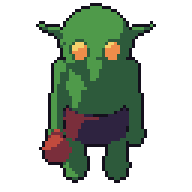
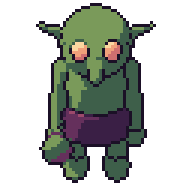
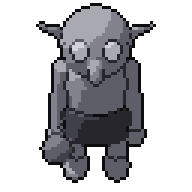
What a palette is for
A palette is a decision made once. With a fixed set of colours, every artist on a game shades the same way, every sprite sits on every background, and the style is recognisable from one screenshot. A palette is not a list of nice colours: it is a few ramps, runs of shades from dark to light, that whole objects can be shaded with.
Step by step
- Pick the colour count from the size of your sprites and the look you want (below).
- List the materials the game needs: skin, hair, cloth, metal, wood, stone, grass, water, fire, the interface. Several can share one ramp.
- Build a ramp for each group, three to five steps from dark to light. See palette ramps.
- Shift the hue along each ramp: shadows towards blue or purple, lights towards yellow. See hue shifting.
- Share the ends. Let ramps meet at their darkest shadow or brightest highlight, so the palette stays small and every material seems lit by the same light.
- Check the brightness steps in greyscale (below).
- Test it on a character, a tile and a prop together, on the game’s real background, before you draw anything else.
- Save it as a
.hexor.gplfile and load it into every tool you use.
How many colours
| Colours | What it gives | Suits |
|---|---|---|
| 4 | one ramp, dark to light | a Game Boy look, game jams |
| 8 | two or three short ramps | bold, simple games, very small sprites |
| 16 | several ramps sharing their ends | a whole game, with planning |
| 32 | room for skin, foliage, metals and effects | most modern pixel-art games |
| 64 and up | almost free colour | large sprites, painterly scenes; hard to keep consistent |
Small sprites need fewer colours: a 16-pixel character has room for three shades per material, not six. Limited palettes goes deeper into working with 4, 8 or 16.
Contrast and value
Players read shapes by brightness first, colour second. Turn your palette to greyscale and check:
- Every ramp steps evenly from dark to light, with no two shades nearly alike.
- The darkest colour is dark enough for outlines and the deepest shadows. A near-black blue or brown sits better than pure black.
- Characters stand out from the ground. If the hero and the floor are the same grey, change one ramp’s brightness, not its hue.
- Saturation peaks in the middle. The mid tones are the most colourful; the darkest and lightest steps drop a little.
- Red and green are told apart by brightness too, not by hue alone, so players with colour blindness can still read them.
Starting from a Lospec palette
Lospec lists thousands of palettes made by pixel artists, searchable by colour count, and downloadable as .hex, .gpl or .png files. Starting from a tested palette saves days. Choose one made for games, with clear ramps and a dark outline colour, then try it on your own sprites. Adding one or two colours you are missing is fine; the rest should come from the palette.
One palette for a whole game
- Share ramps across everything. Characters, tiles, effects and the interface draw from the same palette.
- Keep a few colours only for what matters: the player, pickups, danger. If nothing else uses that bright yellow, the eye finds the coin at once.
- Make variants by swapping colours. A red slime and a blue slime are the same pixels with another ramp; a night level is the same sheet with a darker palette. This is also how many engines recolour at run time.
- Decide early. Changing a palette after hundreds of sprites is costly when they are drawn by hand.
- Mind the engine. Keep texture filtering on nearest-neighbour and colour compression off, or the engine will blend your exact colours.
Common mistakes
- Too many near-identical colours. Two shades the eye cannot tell apart are one colour wasted.
- A ramp per object. A separate ramp for every chest and every hat makes the palette large and the scene noisy.
- Ramps that only darken. They turn grey and muddy; shift the hue.
- Everything saturated. If every colour is loud, nothing stands out.
- Judging the palette as swatches. A palette that looks good as squares can fail on a sprite. Judge it on sprites, on the game’s background, at 1x.
How Pixor does it
In Pixor the palette is set under Colours in the Style. Palette is Auto, one of seven built-in palettes (pixor-16, pixor-8, dusk-12, forest-12, desert-12, ice-10 and mono-8), or Palette file…: a Lospec .hex, a GIMP .gpl, or a .png whose colours become the palette.
- With Auto, Base colours sets how many colours Pixor takes from the model, each with its own ramp; Light bands sets the shades per ramp, and Hue shift how far shadows turn towards blue and lights towards yellow.
- With a fixed palette, the ramps snap to its colours, and Match colours in decides what counts as nearest: OKLab, as the eye judges, or sRGB, as most tools do.
- The 2D View’s Colours (C) shows how often the frame uses each colour, and outlines any two an eye cannot tell apart; Seen as shows the sprite as someone with colour blindness sees it.
- Sheets are indexed PNGs, and the palette export writes
.hexand.gplfiles, so the palette survives into your engine and your editor. - Palette variants (
--variant team:blue,hue:120,palette:pixor-8,night…) write the same sheet in other colours, with an index sheet and a lookup texture for swapping palettes at run time. - Console modes hold a sprite to the colours of the Game Boy, NES, Mega Drive, PICO-8, TIC-80 or C64.
On the command line, pxr render knight.glb --palette my-palette.hex -o knight.png draws a model in your palette. Every model rendered with the same palette and the same Pixels/m fits one game. The free reduce-to-palette tool does the same for a picture in the browser, and palettes shows them all.
Related
- Palette ramps and hue shifting: the two building blocks
- Limited palettes: 4, 8 and 16 colours, and console limits
- Dithering and colour cycling
- Recolour variants and the settings manual
Questions
How many colours should a pixel art palette have?
16 to 32 for most games. 4 to 8 for a strict retro look or a game jam, and up to 64 when a game needs skin tones, foliage, metals and effects. The count matters less than how well the colours work as ramps.
What is the best pixel art palette?
There is none for every game. A good one has a few ramps that each run from a dark to a light colour, a dark colour that works for outlines, and enough contrast in brightness to read in greyscale. Try a few on the same sprite and keep the one that suits your game.
Can I use a Lospec palette in a commercial game?
Most palettes on Lospec are shared for anyone to use. Check the palette's page for what its author asks, and credit the author when you can.
Should every sprite in a game use the same palette?
Yes, or at least palettes that share their ramps. A shared palette is what makes sprites, tiles and the interface look like one world. Use palette swaps for variants, not new colours.