The Dead Cells 3D pipeline, step by step
Dead Cells looks hand-animated, but its characters were animated in 3D and rendered as small pixel-art frames. Its artist described the method in 2018. Here is what it does, why it works, and how to do the same with your own models.
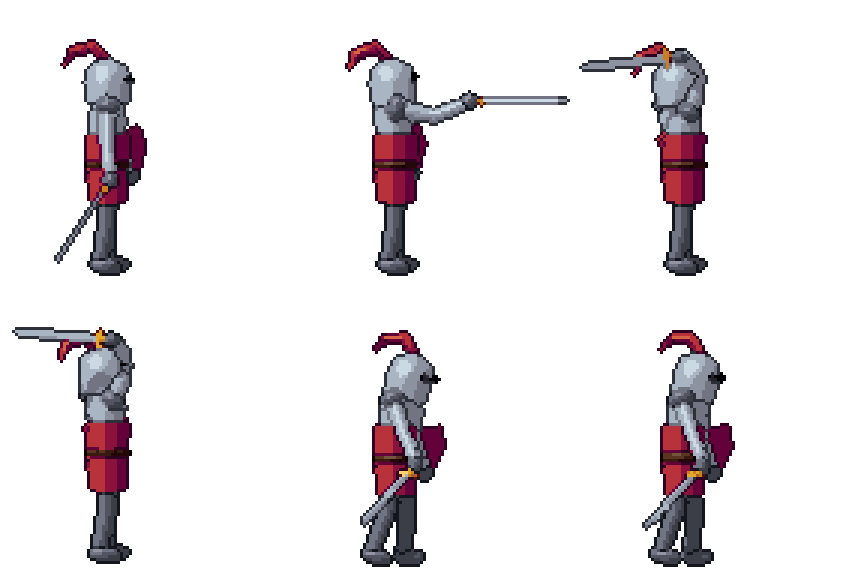
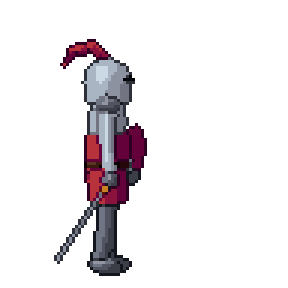
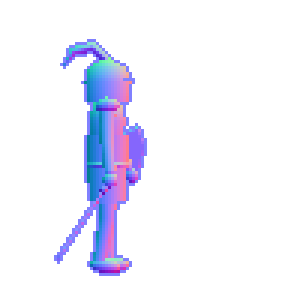
The pipeline, as its artist described it
In January 2018 Thomas Vasseur, for a year the only artist on Dead Cells at Motion Twin, wrote “Art Design Deep Dive: Using a 3D pipeline for 2D animation in Dead Cells” for Gamasutra, now Game Developer. The steps were:
- A pixel-art model sheet first. He drew a basic 2D sheet of the character, then built the character and its skeleton in 3D on top of it, in 3ds Max, and exported it as FBX.
- Very simple models. With a character only about 50 pixels tall in the game, spending time on a detailed 3D model was not worth it.
- Render small, without anti-aliasing. An in-house program rendered the mesh at a very small size with no anti-aliasing, which gives the pixelated look.
- Animate on key frames, like 2D. Attacks were pose-to-pose: the keys were timed with as few frames as possible first, and only then were in-between frames added before or after a key, never between the keys.
- Export every frame with a normal map. Each frame was saved as a PNG with its normal map, so the game could light it with a simple toon shader.
Why it worked
The deep dive gives the reasons plainly. There was no need to redraw every frame. One animation could be reused on several models. A piece of armour was added by attaching it to the 3D model, not by redrawing every frame that showed it. Old models and parts were reused to make new monsters, which he calls the most useful trick in the workflow, saving hundreds of hours.
Most of all, retakes became cheap. When the gameplay programmers changed an attack’s timing or slowed a weapon down, he moved the keys on the timeline and rendered again. With hand-drawn animation the same change would mean redrawing, and often it was simply not done.
Do the same with Pixor
Dead Cells’ renderer was its own and was never released. Pixor is a separate app that covers the same steps for any model you have, rigged in Blender, downloaded from Mixamo or taken from the free library.
Side-view camera. In the Scene step, click the South camera in the Outliner and set Game to Platformer: a side view facing right, one side, mirrored for left. Raise the width and height to 64 or 96 pixels for a character with a weapon; the sprite sizes guide helps choose.
Render small and crisp. Pixor draws each frame on the sprite’s own pixel grid, with no anti-aliased edges by default (--aa 0) and colours limited to the palette’s ramps, one pixels-per-metre scale for every frame and a pivot fixed to one pixel, so the character does not swim.
A look, not just a small render. Dead Cells relied on its lighting and a toon shader. In the Style step, the selout preset gives light bands, hue-shifted ramps and selective outlines, with bands that hold steady from frame to frame so a run does not flicker.
Pose to pose. In the Asset step, the Sprites node’s Kept frames keeps so many smart frames, chosen from the clip’s poses, each held until the next. That is the pose-to-pose cut: the extremes of the swing stay, the soft in-betweens go.
Normal maps. Add the normal map to the export (--export normal), or the light kit (--export light-kit), which lights the sprite from its normals in Godot, Unity or GameMaker while every lit pixel stays on its own colour ramp. See palette-correct lighting.
Armour and weapons. A prop is attached to a bone: a sword in a hand, a helmet on a head (--prop sword.glb:hand.r). Every clip carries it.
Reuse animations. Clips in other files with the same skeleton are added with --anim, or as files named model@clip.fbx beside the model. The motion library’s clips, lib:idle, lib:walk, lib:run, lib:attack and the rest, are fitted to a humanoid skeleton, so a new character has a run and an attack before you animate anything.
From the command line
The knight above, as a build script would make it:
pxr render knight.glb --preset selout --camera platformer --size 96 \
  --clip lib:run --clip lib:attack --smart-frames 8 --export png,json,normal
And the retake: change the clip’s keys in your 3D tool, or the frame count here, and run the same line again. Every frame comes out at the same scale and on the same pivot, so the new sheet drops in where the old one was. The same line over a folder of models (pxr batch models/ --camera platformer --size 96) gives a whole cast one look.
Then touch up
Dead Cells’ frames were finished in 3D. If you want hand-drawn details on top, Pixor writes .aseprite files with a tag per action, and a re-render keeps the layers you painted; see touch up, then re-bake. The history of the technique, from the 1990s to now, is in pre-rendered sprites.
Questions
Did Dead Cells use 3D models for its characters?
Yes. Motion Twin's artist Thomas Vasseur modelled and rigged the characters in 3ds Max from a pixel-art model sheet, animated them in 3D, and rendered every frame small and without anti-aliasing, with a normal map, as he describes in the 2018 Game Developer deep dive.
Is Pixor the tool Dead Cells used?
No. Dead Cells used its own in-house program. Pixor is a separate app that does the same job, 3D animation in and pixel-art frames out, for any glTF, FBX, OBJ or .vox model.
What size were Dead Cells' characters?
The deep dive says the in-game height of a character was only about 50 pixels, which is why the 3D models could stay very simple.