Doom-style sprites, from a 3D model
A boomer shooter's enemies are flat pictures standing in a 3D world, drawn from eight sides so they seem to turn. Here is how the game picks the side, how to render all eight from one 3D model, and the Godot 4 script that shows them.

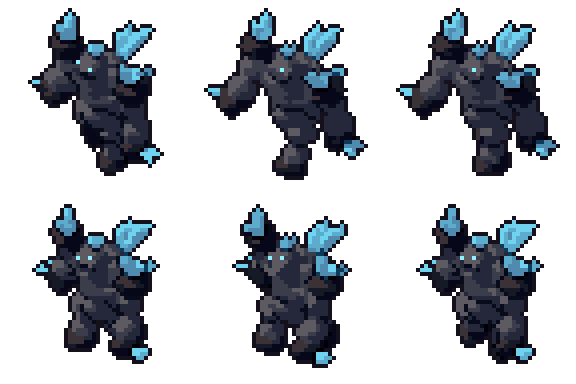
What Doom-style sprites are
In Doom (1993) and Duke Nukem 3D (1996) the levels are 3D, but the monsters are not. Each one is a flat picture, a billboard, that always faces the player. To make it look solid, every frame of every animation is drawn from eight sides, one every 45 degrees: front, front-right, right, back-right, back and so on.
Each time it draws an enemy, the game measures the angle between the way the enemy faces and the direction to the camera, picks the one of eight sectors that angle falls in, and shows that side’s frame. Walk past a monster and it turns its back; let it chase you and it faces you. It is cheap to draw, easy to read at a distance, and it is the look boomer shooters still go for.
Why render them from a 3D model
Eight sides times every frame of a walk, an attack, a pain flinch and a death is hundreds of drawings, and they all have to agree: the same height, the same feet on the same spot, the same colours, an arm that is in the same place in frame 3 seen from the front and from the side. Drawn by hand, the sides drift, and the enemy wobbles in size as it turns.
A 3D model gives every side from the same pose at the same moment. Render it with eight cameras sharing one scale, and the sides match by construction. If you change the design, you render again instead of redrawing every frame.
Rendering eight sides with Pixor
Pixor renders a model’s clips from a ring of cameras into a pixel-art sprite sheet. --ring 8 puts eight cameras round the model, counter-clockwise from the front, named South, Southeast, East, Northeast, North, Northwest, West, Southwest. South sees the model’s face; East sees it facing right.
pxr render imp.glb --clip walk --clip attack --clip death --ring 8 --view side \
  --pixels-per-metre 32 --export png,json,godot -o out/imp.png
--view side keeps the camera near eye level, as in a shooter. --pixels-per-metre fixes the scale, so every enemy you render at 32 shares one pixel size, and all eight cameras share one canvas and one pivot. The command writes:
imp.png, the sheet, a row per action and side, named likewalk_Southeast;imp.json, with each frame’s rectangle and duration, a tag per action and side, the pivot, and undermeta.pixor.sideseach side’s angle in degrees ("South": 0, "Southeast": 45…);imp.tres, a Godot 4SpriteFramesresource with an animation per action and side:walk_South,walk_Southeast,attack_North…
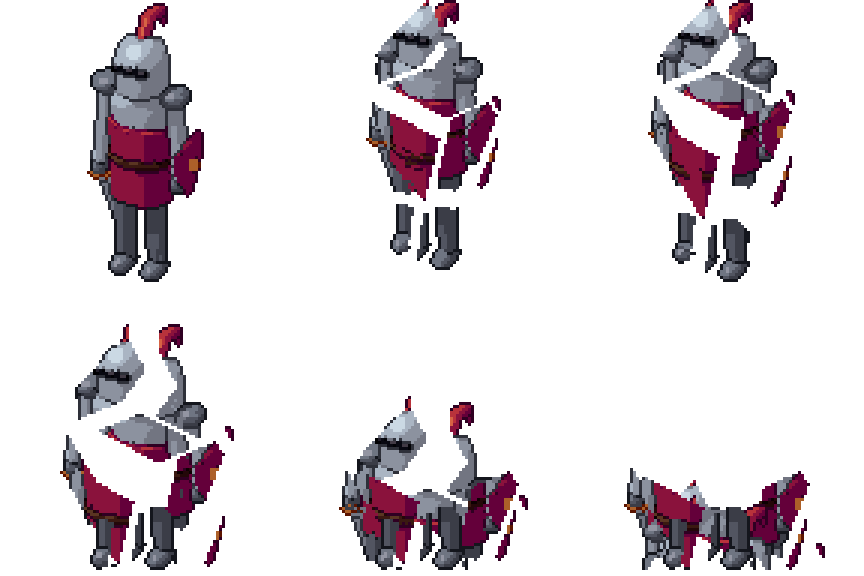
A left-right symmetric enemy needs only five cameras: the asset graph’s Flip node draws West from East, mirrored, the way Doom mirrored many of its monsters. For the death, a death effect breaks or dissolves the last pose on every side.
Showing them in Godot 4
Add an AnimatedSprite3D as a child of the enemy and set its Sprite Frames to imp.tres. Two settings matter: Billboard to Y-Billboard, so the sprite turns to the camera but stays upright, and Texture Filter to Nearest, so pixels stay sharp. Set Pixel Size to one over your pixels per metre (1/32 = 0.03125), and the enemy is its true size in the world.
Then pick the side each frame. The script below uses Pixor’s side order: each side is the enemy turned 45 degrees further counter-clockwise, seen from above, starting from South, facing the camera.
extends AnimatedSprite3D

# Pixor's sides, in order: 45 degrees apart, counter-clockwise seen from above.
const SIDES := ["South", "Southeast", "East", "Northeast", "North", "Northwest", "West", "Southwest"]

@export var action := "walk"

func _ready() -> void:
	billboard = BaseMaterial3D.BILLBOARD_FIXED_Y
	texture_filter = BaseMaterial3D.TEXTURE_FILTER_NEAREST

func _process(_delta: float) -> void:
	var camera := get_viewport().get_camera_3d()
	if camera == null:
		return
	# The enemy faces its -Z, the way look_at() turns a node.
	var body := get_parent() as Node3D
	var facing := -body.global_transform.basis.z
	var to_camera := camera.global_position - body.global_position
	# How far the enemy is turned from facing the camera, counter-clockwise seen from above.
	var turn := atan2(facing.x, facing.z) - atan2(to_camera.x, to_camera.z)
	var side := posmod(roundi(turn / (TAU / 8.0)), 8)
	var anim := "%s_%s" % [action, SIDES[side]]
	if animation != anim:
		# Change side without restarting the clip.
		var keep_frame := frame
		var keep_progress := frame_progress
		play(anim)
		set_frame_and_progress(keep_frame, keep_progress)
Both directions are flattened by atan2 on X and Z, so the camera’s height does not matter. Rounding, not flooring, centres each sector on its side: South covers 22.5 degrees either way of facing the camera. Set action to "attack" or "death" from your enemy’s code, and the side keeps following the camera. Place the sprite so the pivot in imp.json sits on the enemy’s origin, and its feet stay on the floor at every side.
In Unity, and in Blender alone
Unity works the same way: a quad or a sprite that turns about Y only to face the camera, and a script that measures the same angle, rounds it to one of eight sectors and picks the sprite from that side’s row. Blender alone can render eight angles by turning a camera round the model, but the frames come out smooth-shaded and anti-aliased, not pixel art; see 3D to pixel art for what it takes to fix that.
Common mistakes
- Mirrored sides. The enemy seems to turn left when it turns right: the angle’s sign is flipped. Swap the two
atan2terms, or walk the list backwards. - Off by one sector. The front frame shows when the enemy is 45 degrees away: the list starts on the wrong side, or the angle is floored instead of rounded.
- Full billboard. With Enabled instead of Y-Billboard, the sprite leans back as the player looks down, and its feet leave the floor.
- Linear filtering. The default filter blurs every pixel at close range. Use Nearest.
- Mixed pixel scales. Enemies rendered at different sizes and scaled to fit end up with different pixel sizes side by side; see mixels. Render every enemy at one pixels per metre.
For a character that walks in eight directions in a 2D game instead, see 8-direction sprites and Godot’s AnimatedSprite2D.
Questions
How many angles do Doom-style sprites need?
Eight is the classic number: one every 45 degrees. Four looks jumpy when an enemy turns; sixteen is smoother but doubles the frames. A left-right symmetric enemy needs only five drawn sides, the other three mirrored.
Should a billboard sprite face the camera fully or only around Y?
Only around Y for standing enemies. A full billboard tilts the sprite back when you look down at it, so its feet slide and it leans; a Y billboard keeps it upright, like Doom's.
What pixel size should boomer shooter enemies be?
Pick one scale in pixels per metre for every enemy, so a rat is smaller than an ogre by exactly as much as it should be. 32 to 64 pixels per metre suits most low-resolution shooters.