Wall torch free 3D model & sprite sheet
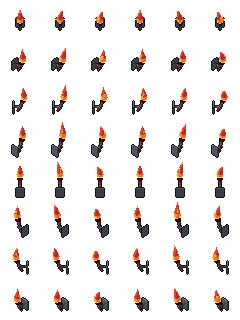
2D pixel art by Pixor, from the 3D model
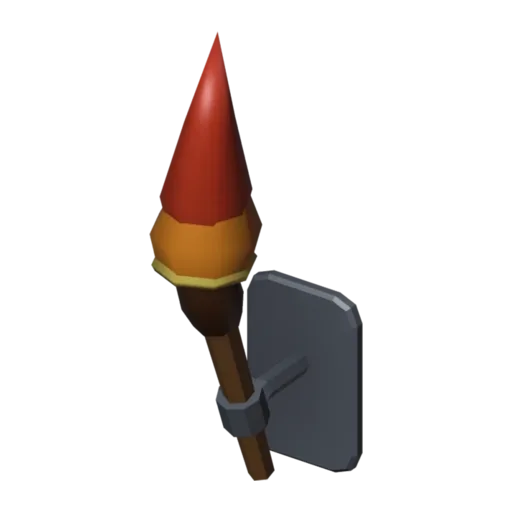
3D the model it was rendered from

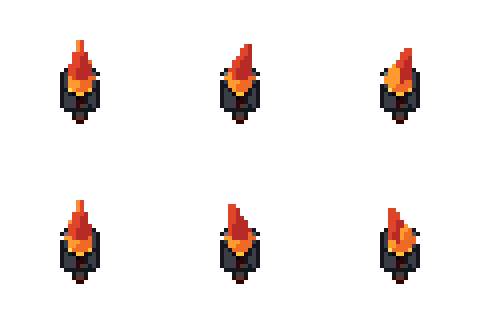
GIFs to share
For a devlog, a post or a Discord message. CC0 like the rest: no credit needed.
A pitch torch with a leather-wrapped handle, held out from a small wall plate by an iron bracket. The flame loops in the Burn clip over six frames. Rendered at 40 pixels from eight sides (or four), so the same torch can hang on any wall of a room.
The flame is a shape-key flipbook with glow materials and colour ramps, much like the campfire’s flame but smaller. The bracket is a curved tube, and the wall plate gives the torch a flat back so it sits flush against masonry.
Wall torches light dungeons, castles and caves. In stealth games they can be put out; in roguelikes they mark explored rooms. Place them in pairs beside doors or at regular spacing along corridors so the rhythm of light guides the player.
Change the flame materials for a blue spirit torch or a green cursed one. Hang them beside the dungeon door, along a room with the treasure chest, or near the magic portal. The lantern is its portable cousin, carried by the player where no torches hang.
Use it in your game
- Godot 4:
godot/wall-torch-selout-40.tresis aSpriteFramesresource with 8 animations (Burn_South, Burn_Southeast … Burn_Southwest): drop it on anAnimatedSprite2Dand playBurn_South. - Aseprite:
aseprite/wall-torch-selout-40.asepritehas a tag for each of those, 48 frames in all, to touch up by hand; its.jsonsits next to it. - Unity, GameMaker and the rest:
sprites/selout/wall-torch-40px-8-sides.pnghas 8 rows of 40×40 px cells, one per action and side, South (front) first. A 4-side sheet and the 32, 48 and 64 px sizes are next to it. - Posts and devlogs: the GIFs above, also in the zip’s
gifs/folder. - 3D: the GLB opens in Blender, Godot, Unity and three.js. The
.blendkeeps its modifiers, named parts and materials.
How this look was made
The sprite above is Pixor’s selective outline look. In Pixor every step of a look is a node you can change: the light bands, the outlines, the palette. This is that look’s Style graph:

- dither
- 0
- fill
- 0
- hysteresis
- 0.05
- min highlight
- 2
- rim
- none
- shadows
- on
- specular
- 0.96

- convex
- none
- crease
- selout1
- crease angle
- 55
- depth jump
- 2.5
- inner
- selout2
- min inner line
- 3
- outer
- selout3
- outer inside
- off
- part lines
- on


The other looks in the player (clean, retro, flat) are other Style graphs. With Pixor you can open this asset, change any node, and render your own.