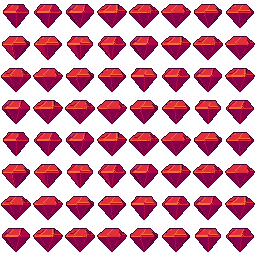
Cut gem free 3D model & sprite sheet
2D pixel art by Pixor, from the 3D model
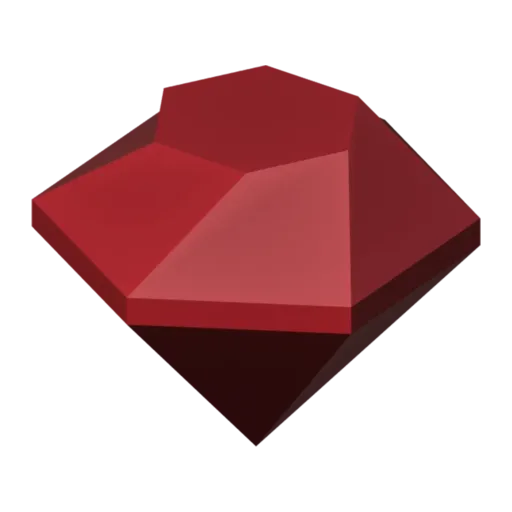
3D the model it was rendered from

GIFs to share
For a devlog, a post or a Discord message. CC0 like the rest: no credit needed.
A brilliant-cut ruby with a flat table on top, a girdle round its widest point and a pointed pavilion underneath. At only 34 triangles it is tiny to store, and its sprites show it spinning in place, each flat facet catching the light in turn as it goes round.
The gem is built from a faceted cut and flat-shaded on purpose: no smoothing, so every face renders as its own clean patch of colour. That is what gives the sprite its sparkle once Pixor reduces it to pixels. The spin comes from Pixor, not from keys in the Blender file.
The Blender file carries four more copies in its extras: sapphire, emerald, amethyst and topaz. Render each one and you have a full set of jewels for loot tables, crafting recipes or a match-three board without touching a single vertex.
Gems work as rare drops in dungeon crawlers, score bonuses in platformers and premium currency in shop screens. Keep them at 32 pixels for pickups and inventory slots, or use a single still frame as an icon. They sit naturally beside the gold coin, inside the treasure chest, or near the blue crystal in a mine or cave level.
Use it in your game
- Godot 4:
godot/gem-selout-32.tresis aSpriteFramesresource with 8 animations (spin_South, spin_Southeast … spin_Southwest): drop it on anAnimatedSprite2Dand playspin_South. - Aseprite:
aseprite/gem-selout-32.asepritehas a tag for each of those, 64 frames in all, to touch up by hand; its.jsonsits next to it. - Unity, GameMaker and the rest:
sprites/selout/gem-32px-8-sides.pnghas 8 rows of 32×32 px cells, one per action and side, South (front) first. A 4-side sheet and the 48 and 64 px sizes are next to it. - Posts and devlogs: the GIFs above, also in the zip’s
gifs/folder. - 3D: the GLB opens in Blender, Godot, Unity and three.js. The
.blendkeeps its modifiers, named parts and materials.
How this look was made
The sprite above is Pixor’s selective outline look. In Pixor every step of a look is a node you can change: the light bands, the outlines, the palette. This is that look’s Style graph:

- dither
- 0
- fill
- 0
- hysteresis
- 0.05
- min highlight
- 2
- rim
- none
- shadows
- on
- specular
- 0.96

- convex
- none
- crease
- selout1
- crease angle
- 55
- depth jump
- 2.5
- inner
- selout2
- min inner line
- 3
- outer
- selout3
- outer inside
- off
- part lines
- on


The other looks in the player (clean, retro, flat) are other Style graphs. With Pixor you can open this asset, change any node, and render your own.