3D animation to sprite sheet
Turning a 3D animation into a sprite sheet means sampling the clip at chosen moments, drawing each pose as a 2D frame from every side the game needs, and writing down how long each frame is held. The model and the camera are the easy part; the frames you keep and how long they stay on screen decide whether the sprite feels alive.
Whether the clip comes from Blender, from Mixamo or from an asset store, it reaches you as keyframes in time: a walk that lasts one second, an attack of 0.8 seconds. A sprite sheet has no time in it, only pictures and durations. Everything in this guide is about that change from time to frames. Getting the file itself in, format by format, is in GLB, FBX or OBJ to a sprite sheet.
1. Choose which moments become frames
There are three ways to cut a clip, and Pixor has all three on the Sprites node in the Asset step:
- An even frame rate (Frames/s). One frame every so many milliseconds, 12 a second unless told. Simple and right for cycles that move at an even pace: walks, runs, flying, idles.
- The poses that matter (Smart frames, then Kept frames says how many). Pixor keeps the poses where the motion turns, more where it is fast, and holds each one until the next. This is how an animator would cut an attack: fewer frames, held longer on the wind-up and the strike. A walk or a run, whose second half is its first mirrored, has its two steps cut alike, so it never limps.
- Frames you pick (Picked frames): times chosen by hand on the timeline, for a sheet with a fixed layout such as an RPG Maker character.
The same attack cut two ways. Above, 12 frames a second: 10 frames of 83 ms. Below, 6 kept frames, held 117, 83, 83, 200, 50 and 267 ms: the raised fist holds, the strike flashes past, and the follow-through stays on screen.
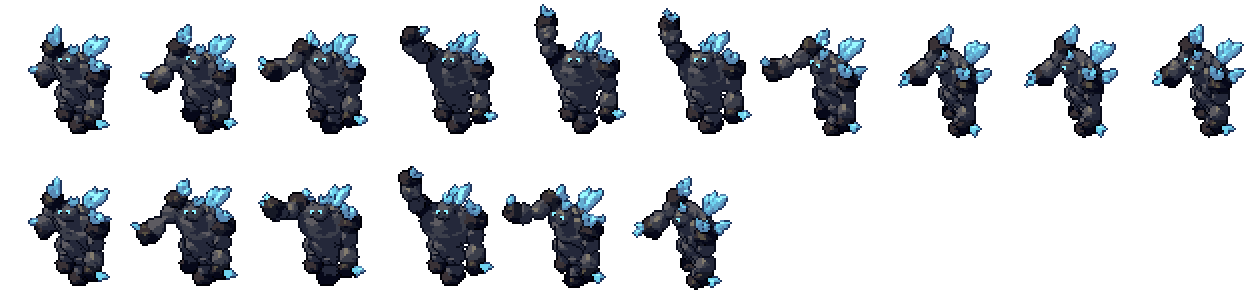
From the command line, --fps 10, --smart-frames 6 and --keys 0,0.25,0.5 set the cut. An even rate is the simple choice for cycles; smart frames suit one-shot moves such as attacks, hits and casts, and cut a walk’s two steps the same way (the library walk at 6 frames: 133, 284 and 83 ms, twice).
2. How many frames each animation needs
| Animation | Frames | Notes |
|---|---|---|
| Idle | 4 to 8 | slow; small moves need sub-pixel animation |
| Walk | 6 to 12 | even timing, loops |
| Run | 6 to 8 | even timing, loops |
| Attack | 4 to 8 | short wind-up, held strike, plays once |
| Hit | 2 or 3 | plays once, hands back to the idle |
| Death | 6 to 10 | plays once, last frame held |
A 3D clip at 30 frames a second has far more frames than a pixel sprite can use: at 32 pixels tall, most neighbouring frames differ by less than a pixel. Fewer frames, each a clear pose, read better. How to animate pixel art explains why.
3. Loops: don’t repeat the first frame
A clip that loops ends where it began. If the sheet keeps both the first and the last pose, the same picture shows twice in a row each time round and the loop stutters. Pixor leaves the end out: a one-second walk at 12 frames a second is 12 frames, not 13.
Which clips loop is read from their names until you say otherwise: a death, a hit, a jump, a spawn or a fall plays once; a walk, an idle or a run loops. The Tag node on the asset graph changes it, and the JSON and the Aseprite file say whether each animation loops, so the engine plays it right.
4. Root motion: in place or travelling
Many clips move the character: a Mixamo walk without In Place ticked travels forward through the clip. A 2D game almost always moves the sprite itself, so the sheet should show the walk on the spot. The action’s Root motion setting has three choices:
| Root motion | What the frames show |
|---|---|
| Keep | the clip as it is, travel and all |
| In place | the root bone pinned horizontally: walking on the spot |
| In place, keep sway | only the clip’s overall travel removed, the side-to-side sway kept |
Either way the JSON keeps each frame’s removed offset in pixels (pixor.root), so a game can move the sprite by exactly what the animation travelled and the feet never slide. On the command line: --root-motion in-place.
5. Holds and hit-stops
A frame’s duration belongs in the sheet, not in your game code. Every frame of the JSON has a duration in milliseconds, and the Aseprite file has the same per-frame durations, so an engine that reads them plays the timing you chose. Holding a strike longer, a hit-stop, is an event with a hold:
pxr render hero.glb --clip attack --fps 12 --event attack@5=hit+150 --export png,jsonFrame 5 of the attack now says hit in the JSON and stays 150 ms instead of 83. A hit-stop holds its frame at least that long and never shortens it. The frame is counted in the clip’s own frames at the frame rate (--fps, 12 a second in a project), so with smart or picked frames the event goes on the kept frame on screen at that moment: frame 5 at 12 a second is 0.42 s in, and in the six-frame cut above it lands on the fourth kept frame, which keeps its own longer hold of 200 ms. Game code that listens for hit deals the damage on the right frame, and footstep events on the frames a foot lands time the sounds. For anticipation and overshoot the clip itself lacks, the Timing node adds them (anticipation and follow-through).
6. Keep every frame steady
A render that looks fine as a still can shimmer as an animation. What to watch:
- One pixel size. Render every animation of a character, and every character, at the same pixels per metre. Two sheets each fitted to their own canvas come out at slightly different scales, which shows as mixels in the game. Use
--pixels-per-metre(the camera’s Pixels/m) when sheets are rendered separately. - One pivot. The point under the feet must be the same pixel in every frame and every side, or the sprite jitters on the spot. Pixor locks it and writes it to the JSON (
meta.pixor.pivot). - No flicker. Light bands, lines and single pixels that change every frame though the model barely moves. Pixor holds them steady, and
pxr renderprints each row’s flicker so you can see it. - Planted feet.
--foot-plant(Plant the feet in the app) keeps a humanoid’s planted feet on the same pixel row in every frame.
7. Several animations and sides in one sheet
A sheet holds one row per animation and side. In the app, add a Sprites node per clip, each with its own cut: a walk at 10 frames a second and an attack in 6 kept frames go on one sheet, at one scale and on one palette. From the command line one cut applies to every clip of a command, so render the cycles and the one-shot moves as two sheets at one pixel size:
pxr render hero.glb --clip walk --clip run --ring 8 --fps 10 --pixels-per-metre 24 --root-motion in-place --export png,json,aseprite,godot -o out/hero.png
pxr render hero.glb --clip attack --ring 8 --smart-frames 6 --pixels-per-metre 24 --export png,json,aseprite -o out/hero_attack.png
Clips kept in separate files that share the skeleton come along on their own when they are named hero@walk.glb, hero@attack.glb; --anim other.fbx adds the clips of any other file.
No animation yet?
A rigged model without the clip you need can still get one. Pixor’s motion library (lib:idle, lib:walk, lib:run, lib:jump, lib:attack, lib:hit, lib:death) fits any humanoid skeleton, and the Gait node (--gait) walks a creature on any number of legs from its rig alone. Props get a spin, a bob or a turntable without a skeleton at all. The walk cycle guide shows the library clips.
In the engine
The JSON uses Aseprite’s array layout, which most importers read: frames[i].frame is the cell, frames[i].duration its hold, and meta.frameTags one tag per animation and side, such as walk_Southeast. Engine by engine:
- Godot 4: the
godotexport is aSpriteFramesresource with an animation per action and side (8-direction sprites in Godot). - Unity: the Aseprite file through the Aseprite Importer, or the PNG sliced by cell size (3D to pixel art in Unity).
- GameMaker: one strip per animation and side (sprite sheets in GameMaker).
Related
- GLB, FBX or OBJ to a sprite sheet and the Mixamo tutorial
- How to animate pixel art and pixel art walk cycle
- Pre-rendered sprites
- The asset manual (Sprites node, Frame range, Hold) and the export manual
Questions
How do I convert a 3D animation to a sprite sheet?
Render the animated model from a fixed orthographic camera at the sprite's real size, at a chosen frame rate or on chosen poses, for each side the game needs; turn each render into clean pixel art; and pack the frames into one image with a data file that gives each frame's place and duration. Pixor does all of it from a GLB, glTF or FBX file.
How many frames should a sprite animation have?
For pixel art, usually 8 to 12 a second of motion: a walk or run 6 to 12 frames, an idle 4 to 8, an attack 4 to 8 with a held strike, a hit 2 or 3, a death 6 to 10. Small sprites need fewer frames, because a pixel cannot move less than a pixel.
Should the last frame of a loop repeat the first?
No. A loop's last frame should lead into the first, not copy it, or the pose shows twice and the loop stutters. A one-second walk at 12 frames a second is 12 frames, the 13th being the first again.
What is root motion in a sprite sheet?
The distance the character travels inside the clip. A sprite sheet usually wants it removed (in place), so the game moves the sprite itself; the travel can be kept per frame in the data file for a game that wants to read it.
Can I make a sprite sheet from a Mixamo animation?
Yes. Download the character with skin and each animation without skin as FBX, and render them together. The Mixamo tutorial goes through it step by step.