Sprites for top-down RPGs
A top-down RPG needs a lot of sprites that all agree with each other. Render them from 3D models with one camera and one scale, and they will.
| View | three-quarter, 40° pitch |
|---|---|
| Size | 32 px characters, 16 or 32 px tiles |
| Sides | 4 (or 8) |
Sample project
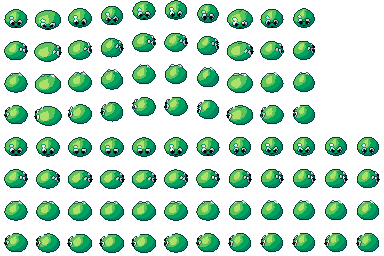
Top-down RPG enemy: the .pixor project and its library model (CC0). The sheet on the left is what it renders.
What a top-down RPG needs
A top-down RPG lives on its cast and its world. You need a hero and party members, townsfolk, enemies, and a lot of props: chests, barrels, signposts, trees, doors and torches. Characters walk in several directions, so each one needs a set of sides. Props usually need only one, unless they can be turned or seen from different angles.
The work adds up fast. Ten characters with four sides, an idle and a walk, is eighty short animations. Rendering them from 3D models keeps them consistent: same light, same outline, same scale.
The camera
The classic look is three-quarter: the camera tilts down so you see the top of a head and the front of a body. A pitch of about 40° works well. It shows faces, keeps floors and tiles reading as flat ground, and leaves room for height on walls and trees.
Characters are commonly 32 px tall on a 16 or 32 px tile grid. Small enemies like slimes can share the same size with more empty space around them, which keeps the scale honest.
Four sides (South, East, North, West) cover most games. Eight sides suit games with free diagonal movement. See directions for how each side is its own camera.
Scale and pivot
Use one pixels-per-metre scale for the whole project, so a slime is smaller than a knight because it is smaller in the scene, not because you squeezed it. Pixor keeps one scale per project for this reason. The pivot is fixed to one pixel, so a character standing on a tile stays on that tile while it animates. Put the pivot at the feet. Sprite sizes has more on choosing a scale.
Animation
Keep loops short. An idle of four to six frames and a walk of six to eight is plenty at 32 px. For humanoid skeletons, Pixor’s motion library has idle, walk, run, jump, attack, hit and death. For props, spin, bob, swing and pulse cover pickups, signs and glowing things. Pixor holds flicker down between frames, so small sprites do not shimmer as they move. More on animation.
Palette
RPGs usually look best with a shared palette across characters, props and tiles. Pick one of the built-in palettes or load your own Lospec .hex or GIMP .gpl file, and use hue-shifted ramps so shadows lean cool and highlights warm. Selective outlines help characters stand out from busy ground. Palette ramps explains how they work.
Free library assets that fit
The free library has plenty for a first town or dungeon:
- Creatures: the slime, skeleton, bat and ghost.
- Treasure: the chest, coin, potion and key.
- Town: the well, house-small, signpost and market-stall.
- Outdoors: the oak-tree, bush and campfire.
The village, forest and dungeon sets group them by place.
Setting it up in Pixor
- Import your model, or open the top-down RPG sample.
- In the Scene step, click the camera “South” in the Outliner. Its “Game” setting sets it up for a kind of game in one click; choose a top-down RPG.
- Use “Ring round the model” to add 4 or 8 cameras. Adjust View, Pitch, Width and Height if you want something different from the preset.
- In the Action step, pick the animations, such as idle and walk.
- In the Style step, pick the look.
- Export writes the sheet. See exports for formats, including Godot SpriteFrames and .aseprite with tags.
The quick start walks through the same steps in more detail.
Questions
Should I use four or eight directions?
Four is enough for most RPGs and halves the drawing budget. Use eight if characters move freely on diagonals and the turn would look wrong without them. In Pixor the choice is a ring of 4 or 8 cameras, so you can try both.
What pitch should the camera have?
Somewhere between 30° and 45° reads as classic three-quarter. The sample uses 40°: you see the top of a head and the front of a body, and tiles still look flat.
Can I mix 3D-rendered sprites with hand-drawn tiles?
Yes. Keep the same pixel size and palette for both and they will sit together. Pixor can map its output to a Lospec .hex or GIMP .gpl palette you already use.